> For the complete documentation index, see [llms.txt](https://www.bluegamma.io/documentation/llms.txt). Markdown versions of documentation pages are available by appending `.md` to page URLs; this page is available as [Markdown](https://www.bluegamma.io/documentation/getting-started/quick-start.md).

# Quick Start

Sign up, set your currency and download your first forward curve, then choose between the web app, Excel Add-in and API.

**Sign up, set your default currency and download your first forward curve.**

BlueGamma gives finance teams access to interest rate curves, swap pricing and FX data through the web app, Excel or the API.

***

## Quick Setup

1. [Sign up](https://auth.bluegamma.io/sign-up) and verify your email.
2. Set your default currency: click the cog next to the currency picker on **Swap Rates** or **Interest Rate Curves**.
3. Download your first curve.

**That's it.** You're ready to go.

{% hint style="info" %}
To jump to any page, curve or FX pair, press **⌘K** (Mac) or **Ctrl+K** (Windows), or click **Search** at the top of the app.
{% endhint %}

***

## Choose How You Work

<table data-header-hidden><thead><tr><th></th><th></th><th></th></tr></thead><tbody><tr><td><h3>🌐 Web App</h3><p>Open a tab, hit Download.</p><pre><code>app.bluegamma.io
</code></pre><p>Best for: Quick lookups, one-off downloads</p></td><td><h3>📊 Excel Add-in</h3><p>Type a function, pull the rate.</p><pre><code>=BlueGamma.SWAP_RATE("SOFR", "SPOT", "5Y")
</code></pre><p>Best for: Model integration, automated refreshes</p></td><td><h3>⚡ API</h3><p>Feed live rates into your platform.</p><pre><code>GET /v1/forward_curve?index=SOFR&#x26;start_date=2D&#x26;end_date=10Y&#x26;frequency=3M
</code></pre><p>Best for: Fintechs, automated systems</p></td></tr></tbody></table>

***

## Core Workflows

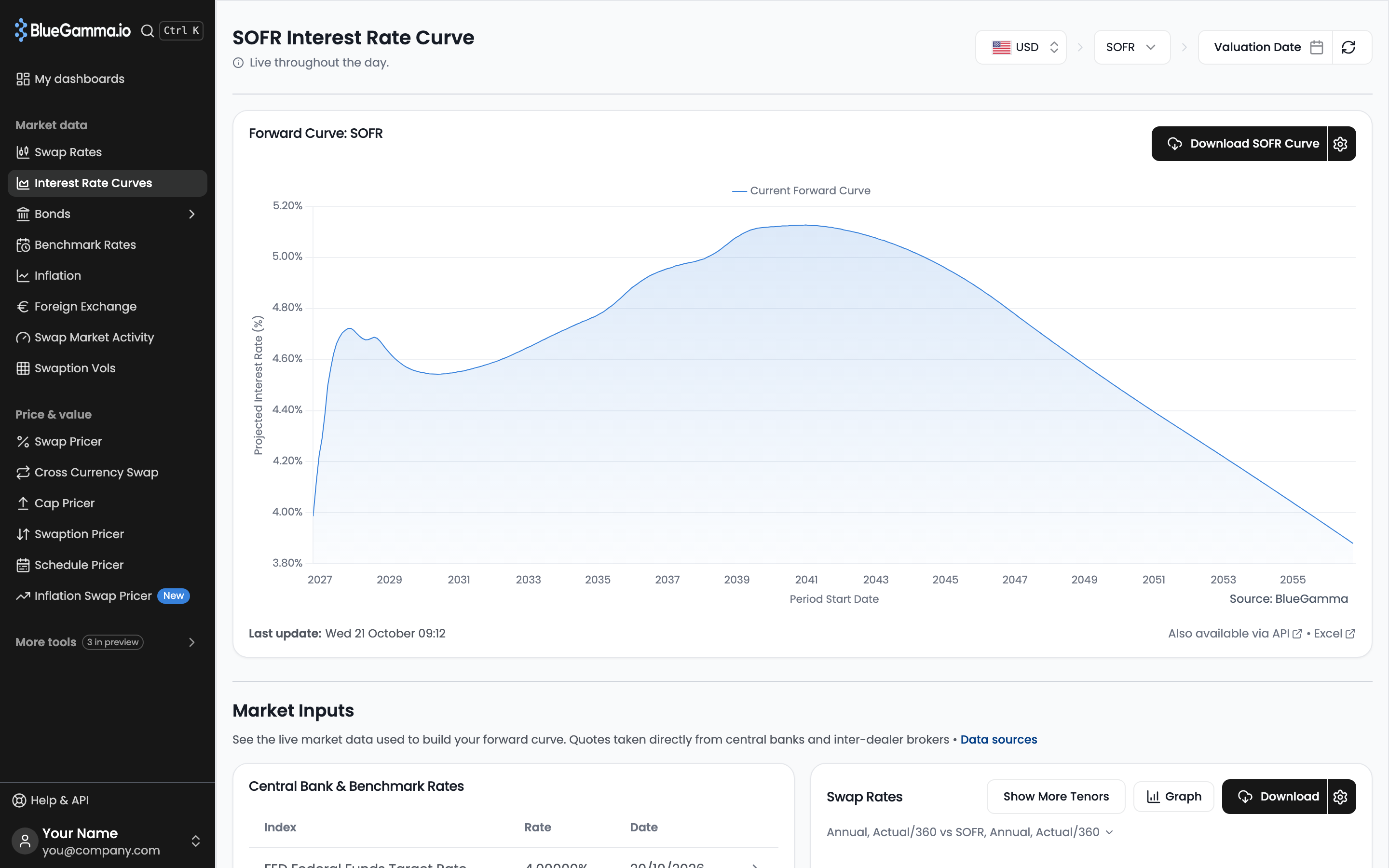
### Download a Forward Curve

1. Go to [**Interest Rate Curves**](https://app.bluegamma.io/interest-rate-curves/usd)
2. Select your currency and index (for example USD and SOFR)
3. Click **Download SOFR Curve** (the button is named after the index you picked)

You get the curve as an Excel file. How far out it goes depends on the index: see [How far out do BlueGamma's curves go?](/documentation/reference/how-far-out-do-bluegammas-curves-go.md)

<figure><img src="https://3184259219-files.gitbook.io/~/files/v0/b/gitbook-x-prod.appspot.com/o/spaces%2FmmQPefoflG1RwUnUKKBR%2Fuploads%2Fgit-blob-b7e27db281f75f06bb6fa04cbf917f0a3d41516f%2Firc-sofr-forward-curve.png?alt=media" alt="The SOFR Interest Rate Curve page with the Download SOFR Curve button"><figcaption></figcaption></figure>

***

### Price an Amortising Swap

1. Go to [**Swap Pricer**](https://app.bluegamma.io/swap-pricer) and click **Price a Swap**
2. Set the **Floating Rate Index**, **Payment Frequency**, **Start Date** and **End Date**
3. Open **Notionals** and paste your notional schedule from Excel
4. Click **Save Swap** to keep it as a quote

<figure><img src="https://3184259219-files.gitbook.io/~/files/v0/b/gitbook-x-prod.appspot.com/o/spaces%2FmmQPefoflG1RwUnUKKBR%2Fuploads%2Fgit-blob-86a2c5a06736d3f1dc54fc2c2704cc3ad1c0b1a9%2Fimage.png?alt=media" alt="The Price a swap ticket in the Swap Pricer"><figcaption></figcaption></figure>

***

### Calculate Mark-to-Market

1. Go to [**Swap Pricer**](https://app.bluegamma.io/swap-pricer)
2. Price your swap as above, turn on **Traded**, enter the **Fixed Rate** you dealt at and click **Save Swap**
3. Open the swap from the **Traded** card to see its current MtM, forecast payments and MtM forecast

The **MTM Historical** tab shows how the swap's value has moved over the past 12 months. See [Swap Mark-to-Market](/documentation/pricers/calculating-the-mtm-of-a-swap.md) for the full valuation page.

<figure><img src="https://3184259219-files.gitbook.io/~/files/v0/b/gitbook-x-prod.appspot.com/o/spaces%2FmmQPefoflG1RwUnUKKBR%2Fuploads%2Fgit-blob-34aaa6a7cf14eb165b0c274e45fe1f0ba69aca17%2Fimage.png?alt=media" alt="The valuation page of a traded swap"><figcaption></figcaption></figure>

***

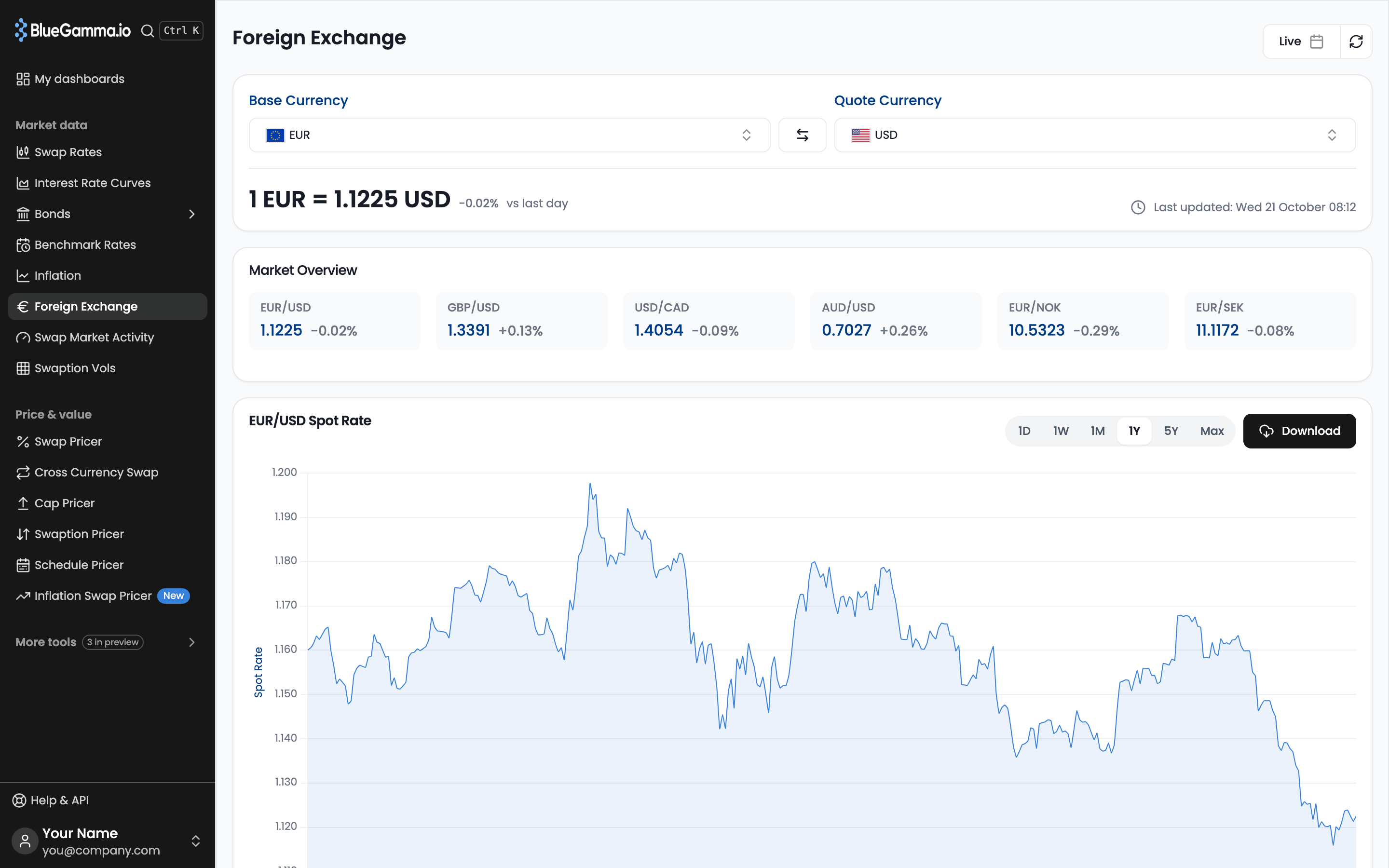
### Download FX Forwards

1. Go to [**Foreign Exchange**](https://app.bluegamma.io/foreign-exchange/eurusd)
2. See live spot, forward points, and forward curve
3. Click **Download** for a dated strip

<figure><img src="https://3184259219-files.gitbook.io/~/files/v0/b/gitbook-x-prod.appspot.com/o/spaces%2FmmQPefoflG1RwUnUKKBR%2Fuploads%2Fgit-blob-126cc402fb8fef42ca02d9331799d8bd38d81fd6%2Ffx-eurusd-overview.png?alt=media" alt="The Foreign Exchange page for EUR/USD with spot, Market Overview and the spot history chart"><figcaption></figcaption></figure>

***

## Excel Add-in Setup

1. In Excel → **Add-ins** store → search **"BlueGamma"** → **Get it now**
2. Sign in with your BlueGamma credentials
3. Type `=BlueGamma.` functions such as `SWAP_RATE` or `FORWARD_RATE` into any cell, or insert one from **Available functions** in the task pane

[**Download Excel Add-in**](https://appsource.microsoft.com/en-us/product/office/wa200007779?tab=overview)

**Tip:** click **Refresh Data** in the task pane to fetch fresh values for the BlueGamma formulas on the active sheet.

***

## Quick Reference

| I need to...                               | Go to                                                                     |
| ------------------------------------------ | ------------------------------------------------------------------------- |
| Download a SOFR/SONIA/EURIBOR curve        | [Interest Rate Curves](https://app.bluegamma.io/interest-rate-curves/usd) |
| Price an interest rate swap                | [Swap Pricer](https://app.bluegamma.io/swap-pricer)                       |
| Value a traded swap (MtM or breakage cost) | [Swap Pricer](https://app.bluegamma.io/swap-pricer), **Traded** card      |
| Get FX forward rates                       | [Foreign Exchange](https://app.bluegamma.io/foreign-exchange/eurusd)      |
| Build a custom monitoring view             | [Dashboards](https://app.bluegamma.io/dashboards)                         |

***

## Data Coverage

For which curves, bonds, FX, inflation and pricing data are available, and whether each is in the web app, API, Excel Add-in or MCP, see [What's Available](/documentation/data-coverage/data-coverage.md).

***

## Need Help?

* **In-app chat**
* **Email**: <support@bluegamma.io>
* **Book a demo**: [Schedule here](https://app.lemcal.com/@alivohra/website-demo?back=1)
* **What's new**: click **What's new** under **Help & Docs** in the app sidebar to see what has shipped recently

***

## Next Steps

* [Setting up your account](/documentation/getting-started/setting-up-your-account.md)
* [Interest Rate Swaps Guide](/documentation/market-data-guides/swap-rates.md)
* [Excel Add-in Documentation](/documentation/integrations/excel-add-in.md)


---

# Agent Instructions
This documentation is published with GitBook. GitBook is the documentation platform designed so that both humans and AI agents can read, navigate, and reason over technical content effectively. Learn more at gitbook.com.

## Querying This Documentation
If you need additional information that is not directly available in this page, you can query the documentation by asking a question.

Perform an HTTP GET request on the following URL with the `ask` and `goal` query parameters:

```
GET https://www.bluegamma.io/documentation/getting-started/quick-start.md?ask=<question>&goal=<user_goal>
```

`ask` is the immediate question: it should be specific, self-contained, and written in natural language.
`goal` is what the user is ultimately trying to achieve, the reason they need the answer. Sharing it helps GitBook give you a better, more relevant answer. A goal is most helpful when it describes the outcome the user wants rather than restating the question. For example, with `ask=how do I create an API token`, a goal like `automate deployments from our CI pipeline` lets GitBook tailor the answer to that use case.

The response will contain a direct answer to the question and relevant excerpts and sources from the documentation.

Use this mechanism when the answer is not explicitly present in the current page, you need clarification or additional context, or you want to retrieve related documentation sections.