> For the complete documentation index, see [llms.txt](https://www.bluegamma.io/documentation/llms.txt). Markdown versions of documentation pages are available by appending `.md` to page URLs; this page is available as [Markdown](https://www.bluegamma.io/documentation/integrations/api/how-to-guides/building-a-historical-time-series.md).
# Building a Historical Time Series
How to retrieve historical swap rate data using the BlueGamma API, whether you need daily end-of-day snapshots or intraday granularity.
If you need a time series of swap rates over days, weeks, or months, the BlueGamma API offers two approaches depending on the granularity you need.
{% hint style="warning" %}
Both approaches need a key with historical access. Keys created on the **API Keys** page (trial and self-serve keys) cover live data only: they cannot call `/historical_swap_rates` or set `valuation_time`. See [Rate Limits & Best Practices](/documentation/integrations/api/rate-limits.md) for how to get historical access.
{% endhint %}
***
## Option 1: Daily snapshots with `/historical_swap_rates`
The `/historical_swap_rates` endpoint returns daily swap rates for a given index and tenor across a date range in a single call. This is the simplest way to build a time series.
```python
import requests
url = "https://api.bluegamma.io/v1/historical_swap_rates"
headers = {"x-api-key": "your_api_key_here"}
params = {
"index": "SOFR",
"tenor": "5Y",
"start_date": "2026-03-23",
"end_date": "2026-03-27"
}
response = requests.get(url, headers=headers, params=params)
data = response.json()
for point in data["swap_rates"]:
print(f"{point['date']}: {point['rate']:.4f}%")
```
```bash
curl -X GET "https://api.bluegamma.io/v1/historical_swap_rates?index=SOFR&tenor=5Y&start_date=2026-03-23&end_date=2026-03-27" \
-H "x-api-key: your_api_key_here"
```
**Response:**
```json
{
"index_name": "SOFR",
"currency": "USD",
"fixed_leg_day_count": "Actual360",
"floating_leg_day_count": "Actual360",
"fixed_leg_frequency": "12M",
"floating_leg_frequency": "12M",
"swap_rates": [
{ "rate": 3.5944, "date": "2026-03-23", "tenor": "5Y" },
{ "rate": 3.6530, "date": "2026-03-23", "tenor": "5Y" },
{ "rate": 3.6027, "date": "2026-03-24", "tenor": "5Y" },
{ "rate": 3.6614, "date": "2026-03-24", "tenor": "5Y" },
{ "rate": 3.6184, "date": "2026-03-25", "tenor": "5Y" },
{ "rate": 3.6720, "date": "2026-03-25", "tenor": "5Y" },
{ "rate": 3.6854, "date": "2026-03-26", "tenor": "5Y" },
{ "rate": 3.7373, "date": "2026-03-26", "tenor": "5Y" }
]
}
```
### Parameters
| Parameter | Required | Description |
| ------------ | -------- | ------------------------------------------------------------------ |
| `index` | Yes | Interest rate index (e.g., `SOFR`, `SONIA`, `6M EURIBOR`) |
| `tenor` | Yes | Swap tenor (e.g., `1Y`, `5Y`, `10Y`) |
| `start_date` | Yes | Start of the date range, inclusive (ISO 8601 format: `YYYY-MM-DD`) |
| `end_date` | Yes | End of the date range, inclusive (ISO 8601 format: `YYYY-MM-DD`) |
### Response fields
| Field | Description |
| ------------------------ | -------------------------------------------------------------- |
| `index_name` | The index requested |
| `currency` | Currency of the swap |
| `fixed_leg_day_count` | Day count convention used for the fixed leg |
| `floating_leg_day_count` | Day count convention used for the floating leg |
| `fixed_leg_frequency` | Payment frequency of the fixed leg |
| `floating_leg_frequency` | Payment frequency of the floating leg |
| `swap_rates` | Array of rate snapshots, each with `rate`, `date`, and `tenor` |
{% hint style="info" %}
You may see multiple rate entries per date. These represent snapshots captured at different times during the day (e.g., European and US market closes). Use the last entry for a given date if you want end-of-day rates.
{% endhint %}
***
## Option 2: Intraday time series with `/swap_rate` + `valuation_time`
If you need rates at specific times during the day, use the `/swap_rate` endpoint with the `valuation_time` parameter. Each call returns a single rate, so you loop through your desired timestamps.
```python
import requests
from datetime import datetime, timedelta
url = "https://api.bluegamma.io/v1/swap_rate"
headers = {"x-api-key": "your_api_key_here"}
# Generate hourly timestamps for a single day
base_date = datetime(2026, 3, 25, 8, 0, 0) # Start at 8am UTC
timestamps = [base_date + timedelta(hours=i) for i in range(10)] # 8am to 5pm
rates = []
for ts in timestamps:
params = {
"index": "SOFR",
"start_date": "SPOT", # spot date as of each valuation_time
"maturity_date": "5Y",
"fixed_leg_frequency": "1Y",
"floating_leg_frequency": "1Y",
"fixed_leg_day_count": "Actual360",
"valuation_time": ts.isoformat() + "Z"
}
response = requests.get(url, headers=headers, params=params)
if response.status_code == 200:
data = response.json()
rates.append({
"time": ts,
"rate": data["swap_rate"]
})
for r in rates:
print(f"{r['time'].strftime('%H:%M')}: {r['rate']:.4f}%")
```
```bash
curl -X GET "https://api.bluegamma.io/v1/swap_rate?index=SOFR&start_date=SPOT&maturity_date=5Y&fixed_leg_frequency=1Y&floating_leg_frequency=1Y&fixed_leg_day_count=Actual360&valuation_time=2026-03-25T10%3A00%3A00Z" \
-H "x-api-key: your_api_key_here"
```
**Example output (fetched 13 Oct 2026):**
```json
{
"index": "SOFR",
"start_date": "2026-03-27",
"maturity_date": "2031-03-27",
"fixed_leg_first_payment_date": "2027-03-29",
"floating_leg_first_payment_date": "2027-03-29",
"floating_leg_frequency": "1Y",
"floating_leg_day_count": "Actual360",
"fixed_leg_frequency": "1Y",
"fixed_leg_day_count": "Actual360",
"valuation_time": "2026-03-25T10:00:00",
"swap_rate": 3.6490,
"timestamp": "2026-03-25T09:59:25"
}
```
Use `SPOT` (or a fixed date) as the start date in historical requests. A tenor such as `0D` counts from today, not from the valuation time, so it would price a forward-starting swap.
***
## Which approach should I use?
| | `/historical_swap_rates` | `/swap_rate` + `valuation_time` |
| --------------- | ----------------------------------------------- | ----------------------------------------------------- |
| **Granularity** | Daily | Any (hourly, per-minute, etc.) |
| **API calls** | 1 call per date range | 1 call per timestamp |
| **Best for** | End-of-day charts, trend analysis, reporting | Intraday monitoring, precise point-in-time valuations |
| **Conventions** | Uses market-standard conventions for each index | You specify leg frequencies and day counts |
| **Date range** | Any historical range | Any historical timestamp |
***
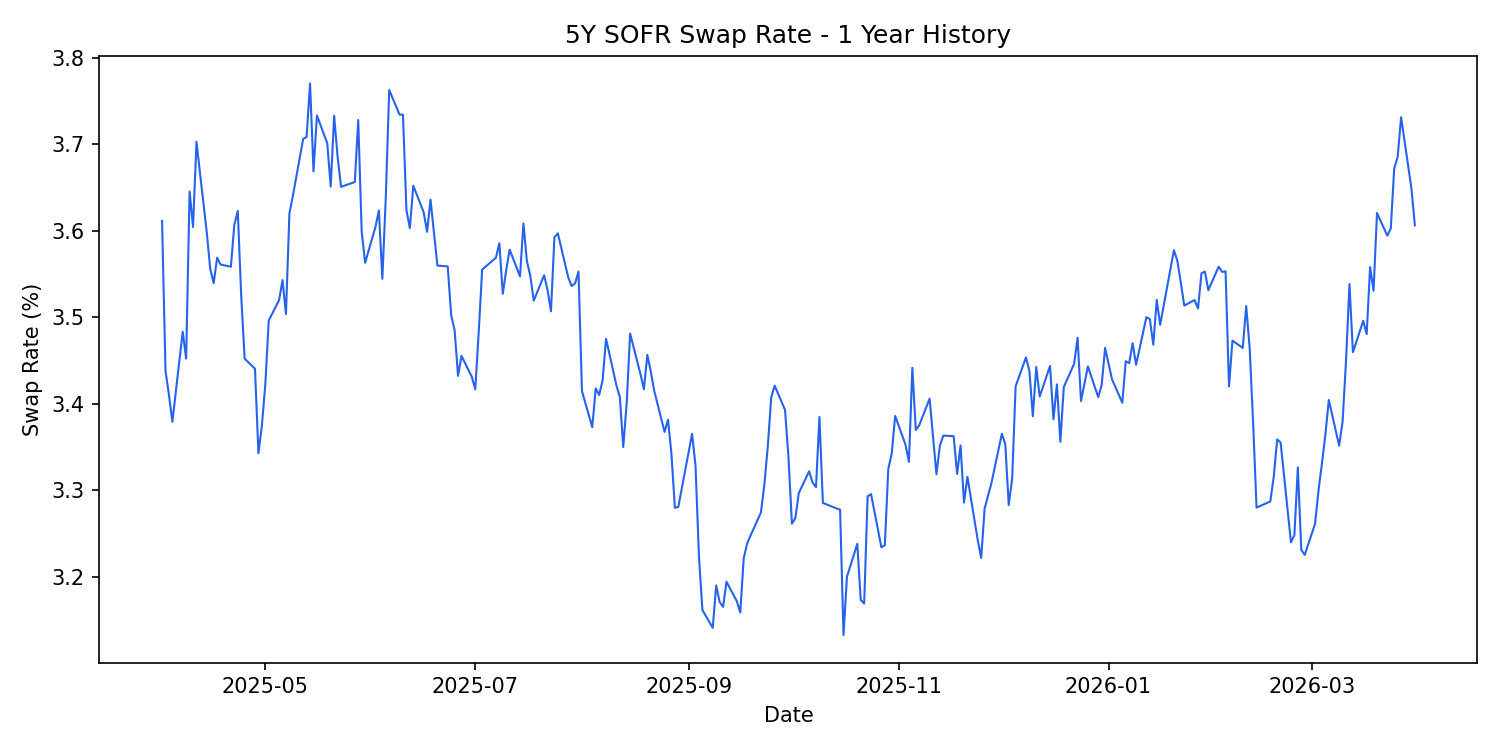
## Practical example: 1-year daily chart
```python
import requests
import matplotlib.pyplot as plt
from datetime import datetime
url = "https://api.bluegamma.io/v1/historical_swap_rates"
headers = {"x-api-key": "your_api_key_here"}
params = {
"index": "SOFR",
"tenor": "5Y",
"start_date": "2025-04-01",
"end_date": "2026-04-01"
}
response = requests.get(url, headers=headers, params=params)
data = response.json()
# Take the last rate per date (end-of-day)
daily = {}
for point in data["swap_rates"]:
daily[point["date"]] = point["rate"]
dates = [datetime.strptime(d, "%Y-%m-%d") for d in sorted(daily.keys())]
rates = [daily[d.strftime("%Y-%m-%d")] for d in dates]
plt.figure(figsize=(10, 5))
plt.plot(dates, rates, linewidth=1)
plt.xlabel("Date")
plt.ylabel("Swap Rate (%)")
plt.title("5Y SOFR Swap Rate - 1 Year History")
plt.tight_layout()
plt.show()
```
5Y SOFR swap rate: 1-year daily history built with /historical_swap_rates
***
## Related Endpoints
| If you need... | Use |
| ------------------------------ | -------------------------------------------------------------------------------------------- |
| A single live swap rate | [`/swap_rate`](/documentation/integrations/api/how-to-guides/fetching-a-swap-rate.md) |
| A full swap curve (all tenors) | [`/get_swap_curve`](/documentation/integrations/api/how-to-guides/fetching-a-swap-curve.md) |
| Forward rate curves | [`/forward_curve`](/documentation/integrations/api/how-to-guides/getting-a-forward-curve.md) |
***
Create a key under **API Keys** in the app sidebar. See [Authentication](/documentation/integrations/api/authentication.md).
---
# Agent Instructions
This documentation is published with GitBook. GitBook is the documentation platform designed so that both humans and AI agents can read, navigate, and reason over technical content effectively. Learn more at gitbook.com.
## Querying This Documentation
If you need additional information that is not directly available in this page, you can query the documentation by asking a question.
Perform an HTTP GET request on the following URL with the `ask` and `goal` query parameters:
```
GET https://www.bluegamma.io/documentation/integrations/api/how-to-guides/building-a-historical-time-series.md?ask=&goal=
```
`ask` is the immediate question: it should be specific, self-contained, and written in natural language.
`goal` is what the user is ultimately trying to achieve, the reason they need the answer. Sharing it helps GitBook give you a better, more relevant answer. A goal is most helpful when it describes the outcome the user wants rather than restating the question. For example, with `ask=how do I create an API token`, a goal like `automate deployments from our CI pipeline` lets GitBook tailor the answer to that use case.
The response will contain a direct answer to the question and relevant excerpts and sources from the documentation.
Use this mechanism when the answer is not explicitly present in the current page, you need clarification or additional context, or you want to retrieve related documentation sections.