> For the complete documentation index, see [llms.txt](https://www.bluegamma.io/documentation/llms.txt). Markdown versions of documentation pages are available by appending `.md` to page URLs; this page is available as [Markdown](https://www.bluegamma.io/documentation/integrations/excel-add-in/functions.md).
# Function Reference
Every BlueGamma Excel Add-in function with its signature and an example: SWAP\_RATE, FORWARD\_RATE, DISCOUNT\_FACTOR, ZERO\_RATE, FIXING, FX, FX\_FORWARD, GOV\_YIELD, BOND\_PRICE and more.
{% hint style="info" %}
**New to the Excel Add-In?** [Install the add-in](/documentation/integrations/excel-add-in/installation-and-setup.md) to start using these formulas.
{% endhint %}
The BlueGamma Excel Add-in includes functions to pull **live**, **forward-looking**, and **historical** interest rate data directly into Excel.
You can also find every function from inside Excel, in the add-in's task pane. See [Browse Functions in Excel](#browse-functions-in-excel).
### 🔧 Core Interest Rate Functions
| Function | Description | Example |
| ----------------------------------------------------------------------------------------------- | --------------------------------------------------------------- | -------------------------------------------------------------- |
| [`SWAP_RATE`](/documentation/integrations/excel-add-in/functions/get-swap-rates.md) | Get the fixed rate for a vanilla interest rate swap | `=BlueGamma.SWAP_RATE("SOFR", "SPOT", "10Y")` |
| [`FORWARD_RATE`](/documentation/integrations/excel-add-in/functions/get-forward-rates.md) | Return the forward rate between two dates for a given index | `=BlueGamma.FORWARD_RATE("SONIA", "2027-06-30", "2027-09-30")` |
| [`DISCOUNT_FACTOR`](/documentation/integrations/excel-add-in/functions/get-discount-factors.md) | Get the discount factor for a given date and rate index | `=BlueGamma.DISCOUNT_FACTOR("3M EURIBOR", "2027-01-01")` |
| [`SWAP_RATE_BY_ID`](/documentation/integrations/excel-add-in/functions/get-swap-rate-by-id.md) | Fetch the rate for a swap saved in the BlueGamma app | `=BlueGamma.SWAP_RATE_BY_ID("swap_abc123")` |
| [`SWAP_MTM_BY_ID`](/documentation/integrations/excel-add-in/functions/get-swap-mtm-by-id.md) | Fetch the mark-to-market value for a saved swap | `=BlueGamma.SWAP_MTM_BY_ID("swap_abc123")` |
| [`FIXING`](/documentation/integrations/excel-add-in/functions/get-fixing.md) | Get the published daily fixing for a given index and date | `=BlueGamma.FIXING("SOFR", "2026-09-30")` |
| [`TIMESTAMP`](/documentation/integrations/excel-add-in/functions/get-timestamp.md) | Get the most recent timestamp for a given rate family and value | `=BlueGamma.TIMESTAMP("RATES", "SOFR")` |
| [`ZERO_RATE`](/documentation/integrations/excel-add-in/functions/get-zero-coupon-rates.md) | Fetches Zero-Coupon rates for a specified index and date. | `=BlueGamma.ZERO_RATE("SOFR", "2026-06-30", "2025-01-01")` |
### 🌍 FX & Macro Functions
| Function | Description | Example |
| ---------------------------------------------------------------------------------------------- | ----------------------------------------------------------------------- | ----------------------------------------------- |
| [`FX`](/documentation/integrations/excel-add-in/functions/get-fx-rate.md) | Get the spot FX rate for a currency pair | `=BlueGamma.FX("EURUSD")` |
| [`FX_FORWARD`](/documentation/integrations/excel-add-in/functions/get-fx-forward-rate.md) | Get the forward FX rate for a currency pair on a future date | `=BlueGamma.FX_FORWARD("GBPUSD", "2027-12-31")` |
| [`GOV_YIELD`](/documentation/integrations/excel-add-in/functions/get-government-bond-yield.md) | Return the zero-coupon government bond yield for a country and maturity | `=BlueGamma.GOV_YIELD("US", "10Y")` |
| [`BOND_PRICE`](/documentation/integrations/excel-add-in/functions/get-bond-price.md) | Get the indicative bond mid price for an ISIN | `=BlueGamma.BOND_PRICE("XS1234567890")` |
| [`BOND_YIELD`](/documentation/integrations/excel-add-in/functions/get-bond-yield.md) | Get the indicative bond yield-to-maturity for an ISIN | `=BlueGamma.BOND_YIELD("XS1234567890")` |
### 💼 Credit Spread Functions
| Function | Description | Example |
| ------------------------------------------------------------------------------------------------------------------- | --------------------------------------------------------- | -------------------------------------------- |
| [`CAN_BANK_SPREAD_HIST`](/documentation/integrations/excel-add-in/functions/get-canadian-bank-spread-historical.md) | Get historical spread for Canadian bank senior debt index | `=BlueGamma.CAN_BANK_SPREAD_HIST("5Y")` |
| [`CAN_BANK_SPREAD_FWD`](/documentation/integrations/excel-add-in/functions/get-canadian-bank-spread-forward.md) | Get forward spread for Canadian bank senior debt index | `=BlueGamma.CAN_BANK_SPREAD_FWD("5Y", "1Y")` |
***
## Browse Functions in Excel
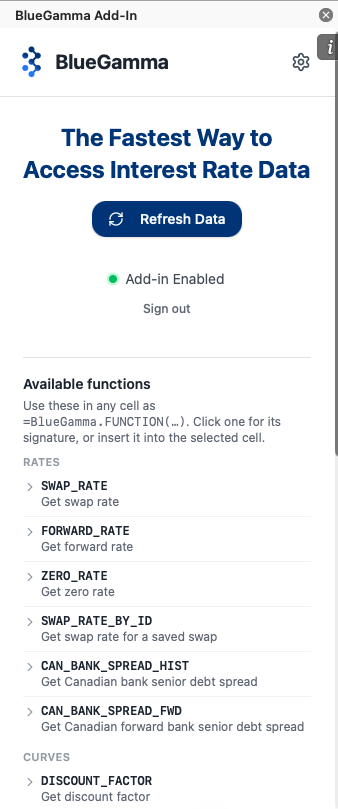
The add-in's task pane lists every function, so you can find the one you need without leaving Excel. The list shows even before you sign in.
### 1. Open the Task Pane
Click the **BlueGamma** button on the **Home** tab of the Excel ribbon.
### 2. Find the Function
Scroll to **Available functions**. Functions are grouped by type: **Rates**, **Curves**, **Fixings**, **Bonds**, **FX** and **MTM**.
### 3. Read the Signature
Click a function to expand it. You see its signature, with optional arguments in square brackets, and a short description of each parameter.
### 4. Insert It or Open Its Docs
* Click **Insert in cell** to add the formula to the selected cell. Where a standard example exists, the formula comes with working arguments, so once you are signed in the cell returns a value straight away. Functions that need your own saved swap ID or ISIN are inserted with empty brackets for you to fill in.
* Click **Docs** to open the function's page in this reference.
If a formula cannot return a value, the cell shows `#VALUE!`. Hover over the cell's error indicator to see why. See [Troubleshooting](/documentation/integrations/excel-add-in/troubleshooting.md) for more.
---
# Agent Instructions
This documentation is published with GitBook. GitBook is the documentation platform designed so that both humans and AI agents can read, navigate, and reason over technical content effectively. Learn more at gitbook.com.
## Querying This Documentation
If you need additional information that is not directly available in this page, you can query the documentation by asking a question.
Perform an HTTP GET request on the following URL with the `ask` and `goal` query parameters:
```
GET https://www.bluegamma.io/documentation/integrations/excel-add-in/functions.md?ask=&goal=
```
`ask` is the immediate question: it should be specific, self-contained, and written in natural language.
`goal` is what the user is ultimately trying to achieve, the reason they need the answer. Sharing it helps GitBook give you a better, more relevant answer. A goal is most helpful when it describes the outcome the user wants rather than restating the question. For example, with `ask=how do I create an API token`, a goal like `automate deployments from our CI pipeline` lets GitBook tailor the answer to that use case.
The response will contain a direct answer to the question and relevant excerpts and sources from the documentation.
Use this mechanism when the answer is not explicitly present in the current page, you need clarification or additional context, or you want to retrieve related documentation sections.