> For the complete documentation index, see [llms.txt](https://www.bluegamma.io/documentation/llms.txt). Markdown versions of documentation pages are available by appending `.md` to page URLs; this page is available as [Markdown](https://www.bluegamma.io/documentation/market-data-guides/bonds/bond-comps.md).
# Bond Comps
Screen and compare individual bonds by yield, spread, rating, sector and tenor, and build a comparables table you can export.
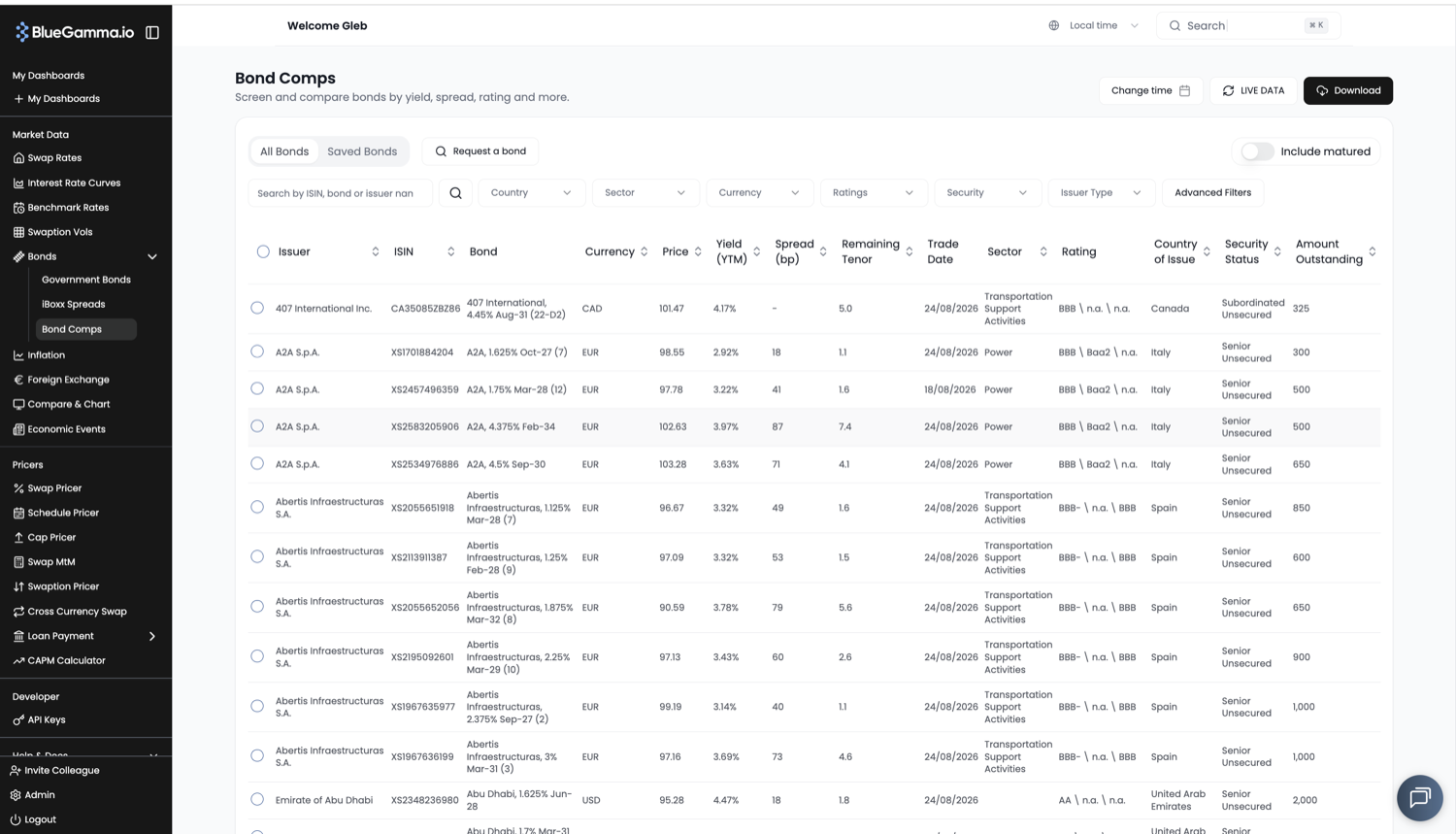
Bond Comps is a screener for individual securities. Use it to benchmark an issuer against comparable bonds, look a bond up by ISIN, or assemble a comparables table for a new issue.
For index-level spreads rather than single bonds, use [iBoxx Spreads](/documentation/market-data-guides/bonds/iboxx-spreads.md).
***
### 1. Open Bond Comps
From the left-hand navigation, click **Bonds** and then [**Bond Comps**](https://app.bluegamma.io/bonds/bond-comps).
***
### 2. All Bonds and Saved Bonds
Two tabs sit at the top of the table.
* **All Bonds** is the full searchable universe.
* **Saved Bonds** is the set you have picked out, so a comparables group you build once is there next time. Pick between saved lists using the list selector beside the tabs.
Use the search box to find a bond by ISIN, bond name or issuer, and the add button to put it into your saved set. The edit, delete and share controls beside it manage the saved group.
***
### 3. Narrow the Universe
Filters run across the top of the table: **Country**, **Sector**, **Currency**, **Ratings**, **Security**, **Issuer Type** and **Advanced Filters**.
**Issuer Type** restricts the table to one class of issuer:
| Issuer Type | What it covers |
| ------------- | ---------------------------------------------------- |
| **Corporate** | Bonds issued by companies |
| **Municipal** | Bonds issued by local and regional government bodies |
| **Sovereign** | Bonds issued by national governments |
The **Include matured** toggle brings bonds that have already redeemed into the table, which is useful when you need a historical comparables set rather than a live one.
***
### 4. Read the Table
| Column | What it shows |
| ------------------------ | --------------------------------------------- |
| **Issuer** | The issuing entity |
| **ISIN** | The security identifier |
| **Bond** | The bond's name, carrying coupon and maturity |
| **Currency** | Denomination |
| **Price** | Indicative price |
| **Yield (YTM)** | Yield to maturity |
| **Spread (bp)** | Spread over the reference curve |
| **Remaining Tenor** | Time left to maturity |
| **Trade Date** | Date of the price shown |
| **Sector** | Issuer sector |
| **Rating** | Credit rating |
| **Country of Issue** | Jurisdiction |
| **Security Status** | Ranking, for example senior or subordinated |
| **Amount Outstanding** | Size of the issue |
| **Previous Closing +/-** | Move against the prior close |
| **1 Week +/-** | Move over the past week |
Every column sorts. Use the page-size selector at the bottom to show more rows at a time.
***
### 5. Value at a Past Date
**Change time** in the top right prices the whole table as at a past date rather than live. **LIVE DATA** returns it to the current market.
***
### 6. Download
**Download** exports the table as you have filtered and sorted it, ready for a comparables page or a pricing memo.
***
### 7. Request a Bond
If a bond you need is not in the universe, click **Request a bond** and submit the ISIN with an optional note. The request goes straight to our support team, who will add it and come back to you.
***
### Related
[iBoxx Spreads](/documentation/market-data-guides/bonds/iboxx-spreads.md)
[FAQs](/documentation/market-data-guides/bonds/faqs.md)
---
# Agent Instructions
This documentation is published with GitBook. GitBook is the documentation platform designed so that both humans and AI agents can read, navigate, and reason over technical content effectively. Learn more at gitbook.com.
## Querying This Documentation
If you need additional information that is not directly available in this page, you can query the documentation dynamically by asking a question.
Perform an HTTP GET request on the current page URL with the `ask` query parameter, and the optional `goal` query parameter:
```
GET https://www.bluegamma.io/documentation/market-data-guides/bonds/bond-comps.md?ask=&goal=
```
`ask` is the immediate question: it should be specific, self-contained, and written in natural language.
`goal` is optional and describes the broader end goal you are ultimately trying to accomplish on behalf of the user. GitBook uses it to tailor the answer towards what is most useful for that goal.
The response will contain a direct answer to the question and relevant excerpts and sources from the documentation.
Use this mechanism when the answer is not explicitly present in the current page, you need clarification or additional context, or you want to retrieve related documentation sections.