> For the complete documentation index, see [llms.txt](https://www.bluegamma.io/documentation/llms.txt). Markdown versions of documentation pages are available by appending `.md` to page URLs; this page is available as [Markdown](https://www.bluegamma.io/documentation/market-data-guides/downloading-fx-forward-rates.md).
# Foreign Exchange
How to view and download FX forward rates in the BlueGamma web app, including as of a past date, plus the FX Forward Pricer, Market Overview and FX volatility cones.
### Step-by-Step Guide to Downloading FX Forward Rates
**1. Login to BlueGamma**
Go to [BlueGamma](https://app.bluegamma.io/) and log in to your account.
If you don't already have an account, [Sign up for a 14-day free trial](https://auth.bluegamma.io/sign-up).
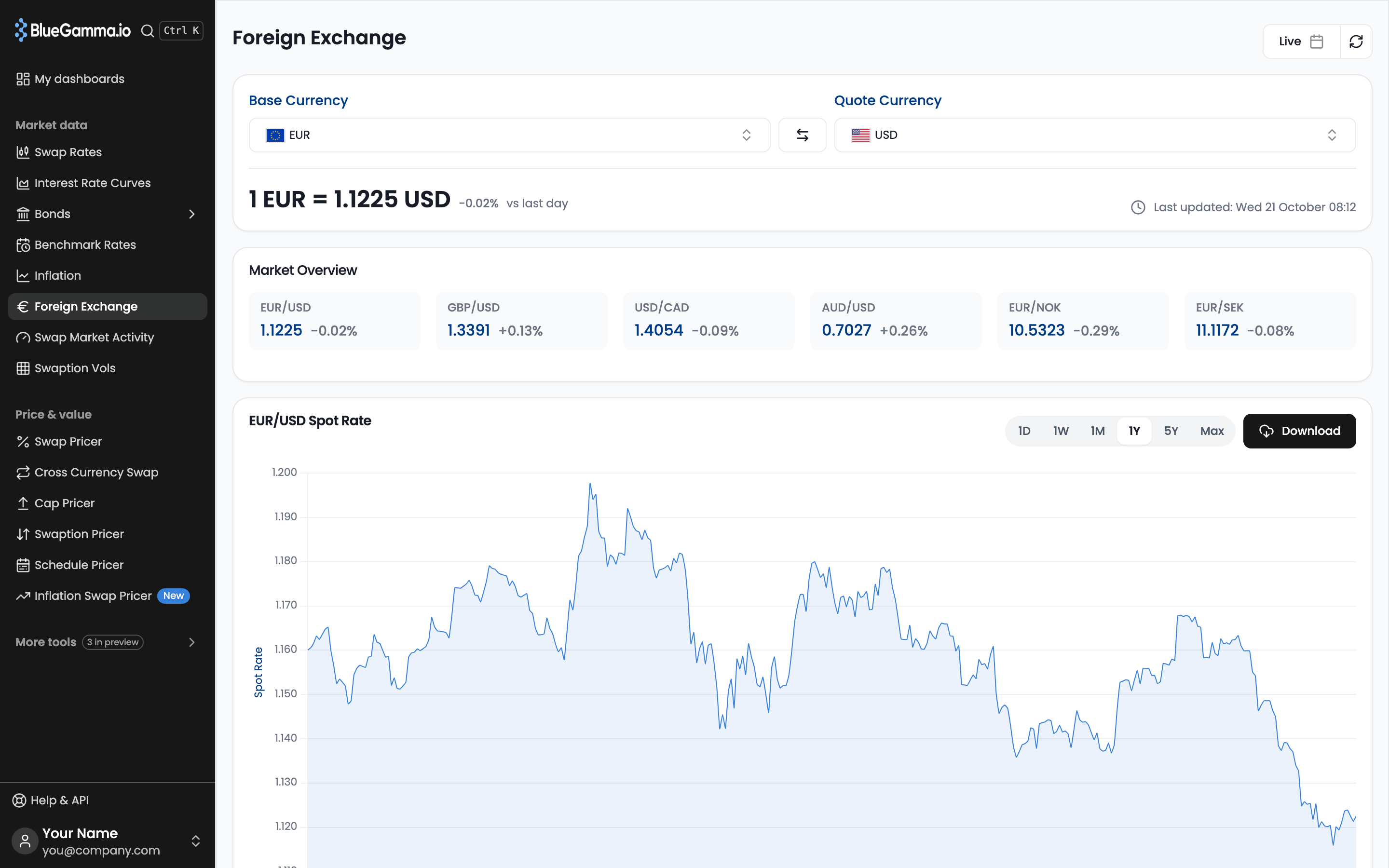
Once logged in, click **‘**[**Foreign Exchange**](https://app.bluegamma.io/foreign-exchange/eurusd)**’** on the left sidebar.
#### 2. Selecting a Currency Pair
* Choose a **Base Currency** (e.g., EUR) and a **Quote Currency** (e.g., GBP) from the dropdown menus.
* The date picker at the top right reads **Live** by default. Pick a past date to see rates as of that day: the spot rate, **Market Overview**, the forwards table, the forward curve and the **FX Forward Pricer** all switch to that date. Click the refresh button next to the picker to return to live rates.
#### 3. Viewing Forward Rate Information
The forwards table (for example **EUR/GBP Forwards Data**) runs from overnight to 10 years:
* The **Spot Rate** displays the current exchange rate.
* **Forward Points** show the difference between the spot rate and the future rate.
* The **Forward Rate (Mid)** is calculated by adding forward points to the spot rate.
* The **Forward Premium** shows how far the forward rate sits above or below the current spot, expressed as a percentage.
* The **FX Forward Curve** chart (for example **EUR/GBP FX Forward Curve**) provides a visual representation of expected future exchange rates.
#### 4. Downloading Forward Data
* Click the **Download** button on the forwards table or the forward curve chart to export the FX forward rates.
* An Excel file downloads, ready to use in financial models. If you picked a past date, the file is as of that date.
### Additional Features
* **Market Overview**: Tiles for EUR/USD, GBP/USD, USD/CAD, AUD/USD, EUR/NOK and EUR/SEK. Click one to open that pair.
* **Historical Data**: Use the historical spot rate graph to analyze past trends, over periods from 1D to Max, and **Download** it.
* **Data Updates**: The system refreshes rates automatically to provide up-to-date information.
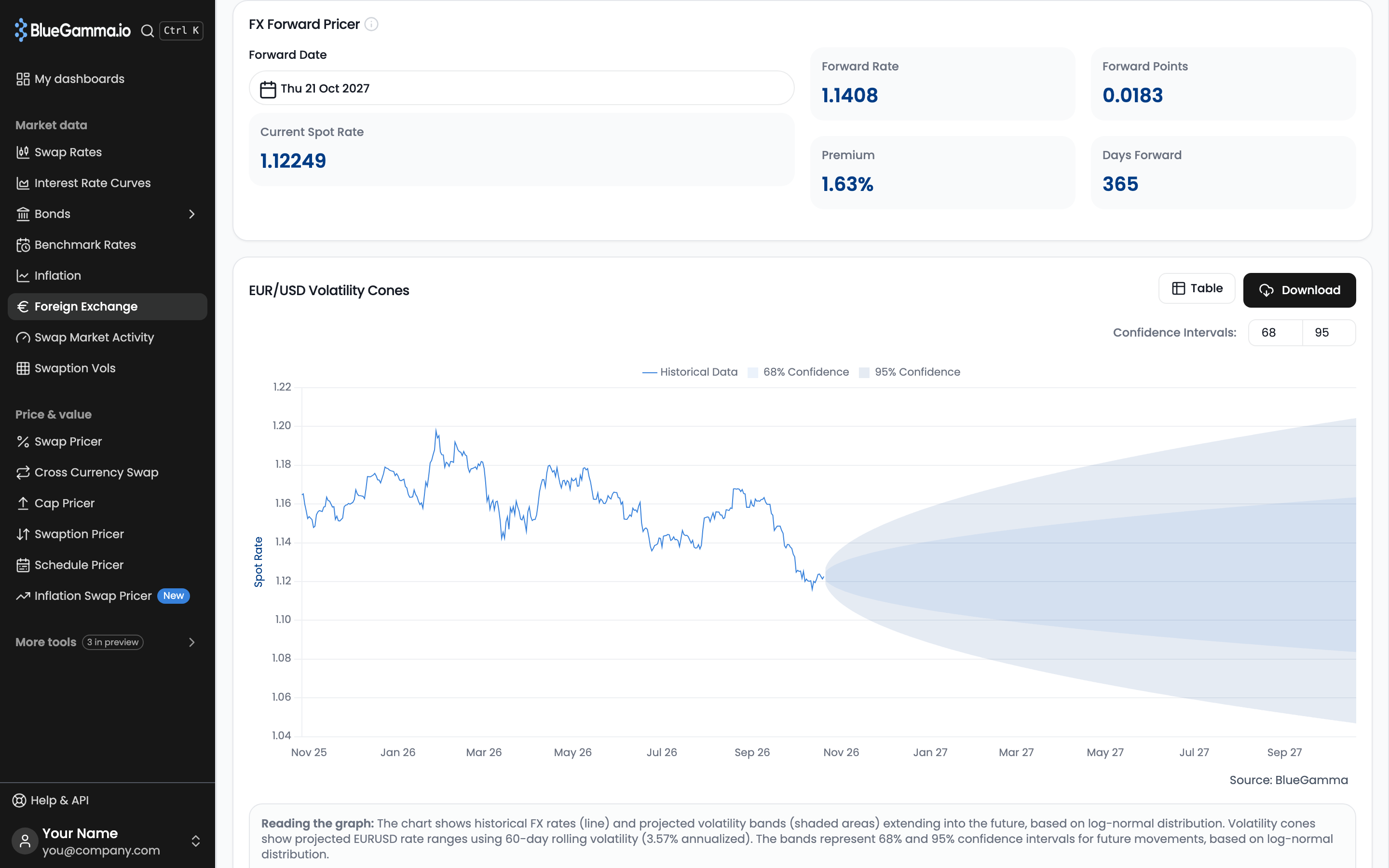
* **FX Forward Pricer**: Pick a **Forward Date** to see the forward rate, forward points, premium and days forward against current spot.
* **Volatility Cones**: View projected rate ranges based on 60-day rolling volatility, with adjustable confidence intervals and a toggle between chart and table.
---
# Agent Instructions
This documentation is published with GitBook. GitBook is the documentation platform designed so that both humans and AI agents can read, navigate, and reason over technical content effectively. Learn more at gitbook.com.
## Querying This Documentation
If you need additional information that is not directly available in this page, you can query the documentation by asking a question.
Perform an HTTP GET request on the following URL with the `ask` and `goal` query parameters:
```
GET https://www.bluegamma.io/documentation/market-data-guides/downloading-fx-forward-rates.md?ask=&goal=
```
`ask` is the immediate question: it should be specific, self-contained, and written in natural language.
`goal` is what the user is ultimately trying to achieve, the reason they need the answer. Sharing it helps GitBook give you a better, more relevant answer. A goal is most helpful when it describes the outcome the user wants rather than restating the question. For example, with `ask=how do I create an API token`, a goal like `automate deployments from our CI pipeline` lets GitBook tailor the answer to that use case.
The response will contain a direct answer to the question and relevant excerpts and sources from the documentation.
Use this mechanism when the answer is not explicitly present in the current page, you need clarification or additional context, or you want to retrieve related documentation sections.