> For the complete documentation index, see [llms.txt](https://www.bluegamma.io/documentation/llms.txt). Markdown versions of documentation pages are available by appending `.md` to page URLs; this page is available as [Markdown](https://www.bluegamma.io/documentation/market-data-guides/forward-curves/downloading-a-forward-curve.md).
# Viewing & Downloading Forward Curves
How to view a forward curve in the BlueGamma web app, choose the currency and index, set the frequency and download it to Excel, plus the other cards on the Interest Rate Curves page.
#### **1. Log In to BlueGamma**
Go to [BlueGamma](https://app.bluegamma.io/) and log in to your account.
If you don't already have an account, [Sign up for a 14-day free trial](https://auth.bluegamma.io/sign-up).
Once logged in, click **‘**[**Interest Rate Curves**](https://app.bluegamma.io/interest-rate-curves/usd)**’** on the left sidebar.
#### **2. Select Your Currency and Index**
In the top-right corner of the curve page:
* Use the **currency drop-down menu** to select your desired currency (e.g., GBP, USD, EUR).
* Use the **index drop-down** next to it to pick the floating rate index, for example SOFR or 6M EURIBOR.
#### **3. Customize Your Curve**
You can further tailor the curve to your requirements:
* **Frequency:** Click the **cog** beside the download button to open **Adjust your curve**, then pick the **Model Frequency** (1M, 3M, 6M, 12M or All).
* In the same dialog you can also set the **Curve Valuation Date**, the **Curve start date**, **End of month dates?**, the **Excel data orientation** and the **Excel date format**.
#### **4. Download Your Curve**
Once your curve is configured:
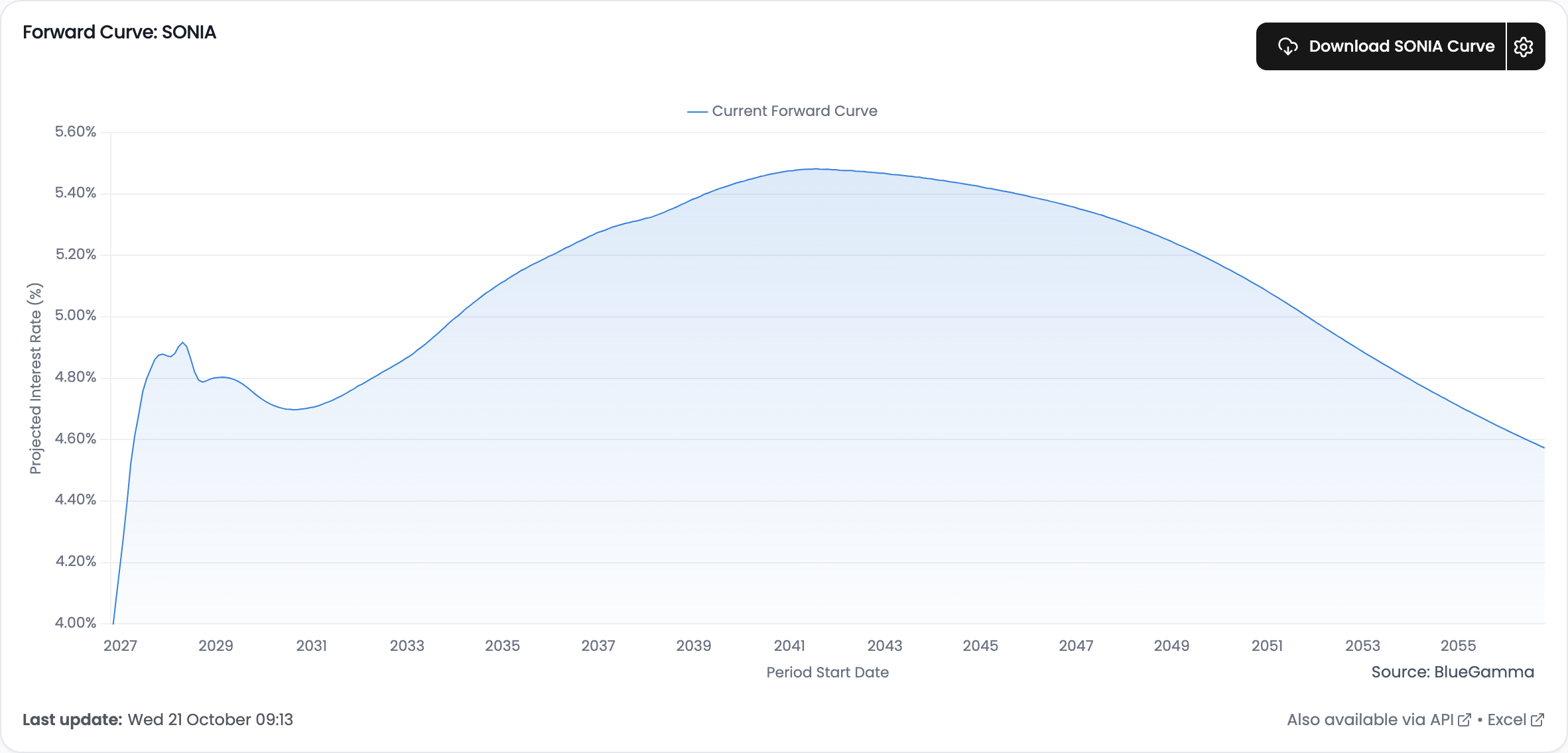
* In the **Forward Curve** card at the top of the page, click the download button, which is named after your index (for example **Download SOFR Curve**), to export the curve to Excel.
* If you opened **Adjust your curve**, click **Download** in the dialog instead.
***
### Other Cards on Interest Rate Curves
Below the forward curve, the page has two more sections, **Market Inputs** and **Related Analytics**. Which cards appear depends on the currency.
| Card | What it shows |
| ---------------------------------------------------------------------- | ------------------------------------------------------------------------------------------------------------------------------------------------------------------------------------------------------------------------------------------------------------------------------------------------------------------------------------------------------------------------------------------------ |
| **Market Inputs** | The quotes the curve is built from: a **Central Bank & Benchmark Rates** table and a **Swap Rates** card with the par swap rate at each tenor, as a table or graph. The cog beside the swap rates **Download** opens **Customised Swaps Download**; see [Download a Custom Table of Swap Rates](/documentation/market-data-guides/swap-rates/advanced/download-a-custom-table-of-swap-rates.md). |
| **Volatility Cones** (for example **10Y Swap Rate: Volatility Cones**) | How far the swap rate could move over horizons from 1 week to 24 months, at the **Confidence Intervals** you set. Switch between graph and table, and **Download** to Excel. Not shown for BRL. |
| **Forward Starting Swap Rate** | The swap rate the curve implies for swaps starting at future dates, for the tenors you select. Its download dialog, **Download multiple tenors:**, exports several tenors at once. |
| **Forward Curves vs Realised** | Forward curves from past dates overlaid on the rate that actually fixed, so you can see how earlier forecasts compared with the outcome. EUR, GBP, USD and CAD only, with **Download**. |
| **FOMC Dot Plot** | USD only. The **Median FOMC projection** for the policy rate against **Historical SOFR** and the current forward curve. |
| **Discount Factors** | The discount factors from the curve, charted, with an Excel export. |
| **TLP and IPCA Rates** | BRL only. See [How to Access BRL Forward Curves and Download TLP Forecasts](/documentation/market-data-guides/forward-curves/advanced/how-to-access-brl-forward-curves-and-download-tlp-forecasts.md). |
---
# Agent Instructions
This documentation is published with GitBook. GitBook is the documentation platform designed so that both humans and AI agents can read, navigate, and reason over technical content effectively. Learn more at gitbook.com.
## Querying This Documentation
If you need additional information that is not directly available in this page, you can query the documentation by asking a question.
Perform an HTTP GET request on the following URL with the `ask` and `goal` query parameters:
```
GET https://www.bluegamma.io/documentation/market-data-guides/forward-curves/downloading-a-forward-curve.md?ask=&goal=
```
`ask` is the immediate question: it should be specific, self-contained, and written in natural language.
`goal` is what the user is ultimately trying to achieve, the reason they need the answer. Sharing it helps GitBook give you a better, more relevant answer. A goal is most helpful when it describes the outcome the user wants rather than restating the question. For example, with `ask=how do I create an API token`, a goal like `automate deployments from our CI pipeline` lets GitBook tailor the answer to that use case.
The response will contain a direct answer to the question and relevant excerpts and sources from the documentation.
Use this mechanism when the answer is not explicitly present in the current page, you need clarification or additional context, or you want to retrieve related documentation sections.