> For the complete documentation index, see [llms.txt](https://www.bluegamma.io/documentation/llms.txt). Markdown versions of documentation pages are available by appending `.md` to page URLs; this page is available as [Markdown](https://www.bluegamma.io/documentation/pricers/capm-calculator.md).
# CAPM Calculator
Calculate a cost of equity with the CAPM from a 10Y government bond yield, an equity risk premium that includes country risk, and your beta.
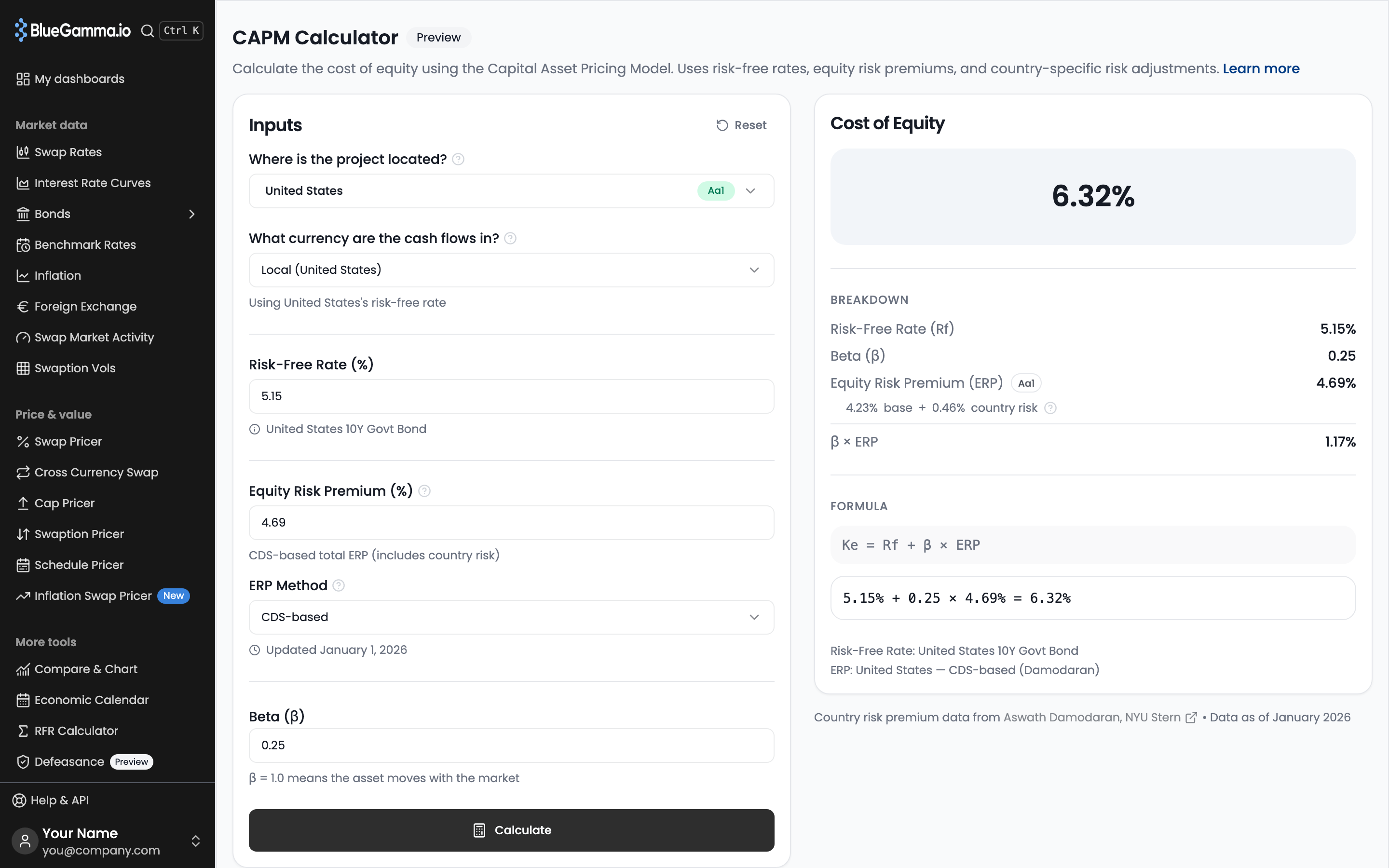
The **CAPM Calculator** works out the cost of equity for a project in a given country. It fills in a risk-free rate and an equity risk premium that includes country risk; you set the beta.
Open it from the sidebar in the **Pricers** section under **CAPM Calculator**. The page is marked **Preview**.
***
### 1. Choose the Country and Currency
* **Where is the project located?**: search by country, region or rating. Each country shows its Moody's sovereign rating. The country sets the equity risk premium. Defaults to United States.
* **What currency are the cash flows in?**: sets whose risk-free rate is used. The line under the field confirms it.
| Option | Risk-free rate used |
| ----------------------------- | --------------------- |
| **Local (country)** (default) | The project country's |
| **USD** | United States |
| **EUR** | Germany |
| **GBP** | United Kingdom |
***
### 2. Check the Rates
* **Risk-Free Rate (%)**: the country's 10Y government bond yield, filled in automatically. The line under it names the source, for example "United States 10Y Govt Bond". If the country has no 10Y yield, the US 10Y is used and the line says so.
* **Equity Risk Premium (%)**: the total premium for the project country, a mature market premium plus a country risk premium.
* **ERP Method**: how country risk is measured.
* **CDS-based** (default): from the country's sovereign CDS spread. It shows **(not available)** when there is no CDS data, and the rating-based premium is used.
* **Rating-based**: from the country's Moody's sovereign rating, shown in the option label.
**Updated** under the method shows the date of the country risk data.
Type in either rate field to use your own figure. **Reset** next to the field restores the automatic one. Choosing another country resets both.
***
### 3. Set the Beta
**Beta (β)** defaults to 0.25 and must be above 0. A beta of 1.0 means the asset moves with the market.
Click **Calculate**. **Reset** at the top of the **Inputs** card restores all defaults.
***
### 4. Read the Result
The **Cost of Equity** card shows the result, then:
| Section | What it shows |
| ------------- | ------------------------------------------------------------------------------------------------------------------------------------------------------------- |
| **Breakdown** | **Risk-Free Rate (Rf)**, **Beta (β)**, **Equity Risk Premium (ERP)** with the country's rating, the premium split into base and country risk, and **β × ERP** |
| **Formula** | Ke = Rf + β × ERP, then the same with your numbers |
| Sources | The cash-flow currency (unless local), the risk-free rate used, and the country and ERP method. A figure you typed shows as **Custom** |
The base and country risk split appears only when the premium was filled in automatically. Under the result, the calculator shows the source and date of the country risk data.
There is no export. Copy the figures from the card.
## How It Is Calculated
$$
K\_e = R\_f + \beta \times ERP
$$
where $$ERP$$ is the mature market premium plus the country risk premium for the chosen method. The base figure in the breakdown is the total ERP minus that country risk premium. Rates filled in automatically are rounded to 2 decimal places.
## Related
* [Accessing Bond Yields](/documentation/market-data-guides/bonds/accessing-bond-yields.md): government bond yields, including the 10Y yields used as risk-free rates
---
# Agent Instructions
This documentation is published with GitBook. GitBook is the documentation platform designed so that both humans and AI agents can read, navigate, and reason over technical content effectively. Learn more at gitbook.com.
## Querying This Documentation
If you need additional information that is not directly available in this page, you can query the documentation by asking a question.
Perform an HTTP GET request on the following URL with the `ask` and `goal` query parameters:
```
GET https://www.bluegamma.io/documentation/pricers/capm-calculator.md?ask=&goal=
```
`ask` is the immediate question: it should be specific, self-contained, and written in natural language.
`goal` is what the user is ultimately trying to achieve, the reason they need the answer. Sharing it helps GitBook give you a better, more relevant answer. A goal is most helpful when it describes the outcome the user wants rather than restating the question. For example, with `ask=how do I create an API token`, a goal like `automate deployments from our CI pipeline` lets GitBook tailor the answer to that use case.
The response will contain a direct answer to the question and relevant excerpts and sources from the documentation.
Use this mechanism when the answer is not explicitly present in the current page, you need clarification or additional context, or you want to retrieve related documentation sections.