> For the complete documentation index, see [llms.txt](https://www.bluegamma.io/documentation/llms.txt). Markdown versions of documentation pages are available by appending `.md` to page URLs; this page is available as [Markdown](https://www.bluegamma.io/documentation/pricers/cross-currency-pricer.md).
# Cross-Currency Swap Pricer
Price a cross-currency swap and see the rate on synthetic debt, so you can compare issuing at home with issuing abroad and swapping back.
A cross-currency swap turns debt in one currency into debt in another. The Cross-Currency Swap Pricer calculates the rate on that synthetic debt, so you can answer a simple funding question: is it cheaper to issue in your home market, or to issue abroad and swap the money back?
{% hint style="info" %}
Already know how cross-currency swaps work? Skip to [Using the pricer](#using-the-pricer).
{% endhint %}
## What is a cross-currency swap?
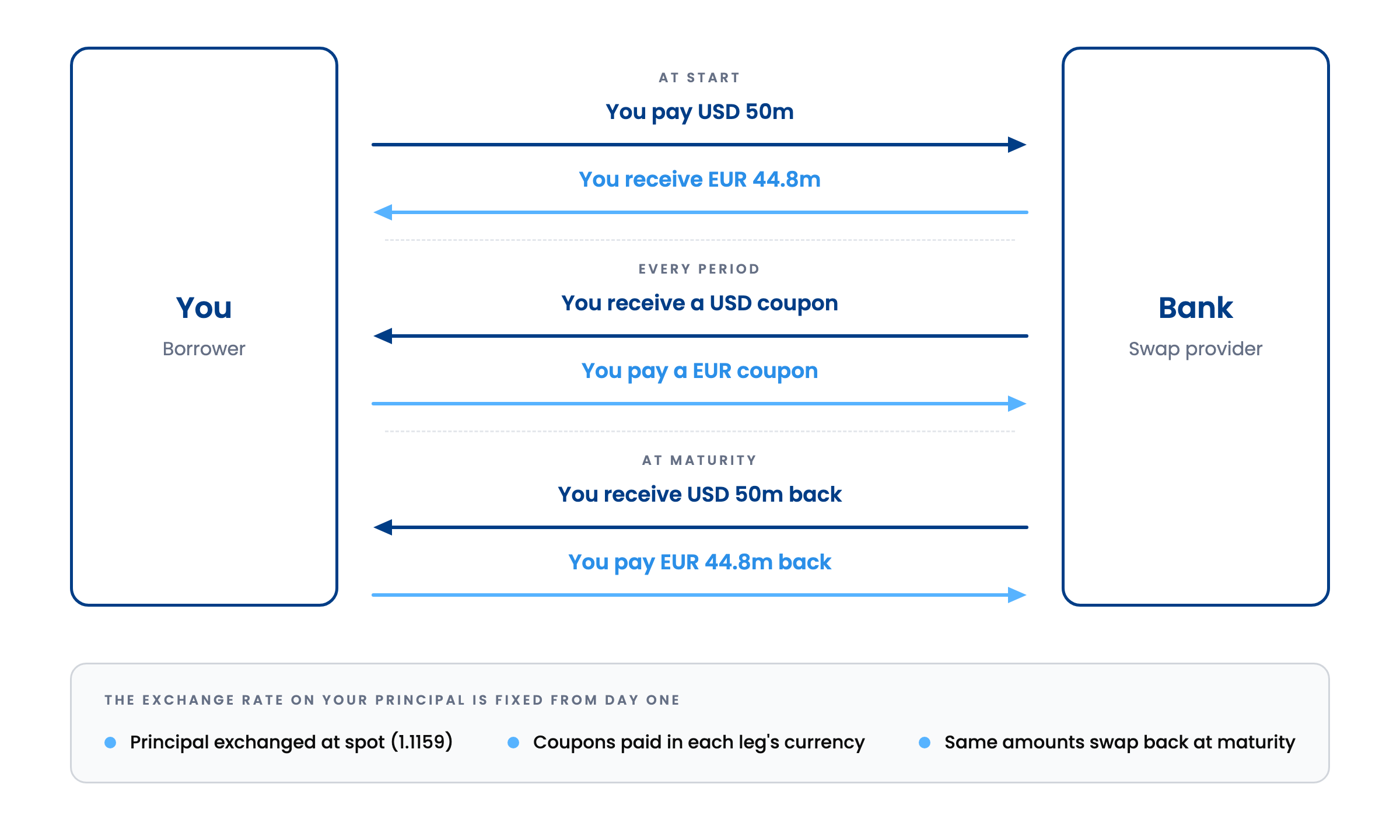
You and a bank exchange principal and interest in two currencies. There are three sets of cash flows:
* **At start**, you exchange principal at today's spot FX rate.
* **Every period**, each side pays interest in the currency it received. Coupons can be fixed or floating.
* **At maturity**, the same principal amounts swap back, at the starting FX rate rather than whatever spot is on the day.
A USD 50m swap into EUR at 1.1159
Because the principal swaps back at the rate you started with, both your coupons and your principal are hedged against FX moves for the life of the deal. That is the main difference from an [interest rate swap](/documentation/market-data-guides/swap-rates.md), where only interest changes hands and both legs are in one currency.
## Synthetic debt: issue at home, or abroad and swap back?
Take a euro-based borrower who needs EUR funding. There are two routes:
1. **Issue in EUR.** You pay the EUR benchmark plus your credit spread in the EUR market.
2. **Issue in USD and swap into EUR.** You pay USD coupons to your investors. The swap pays you matching USD coupons, and you pay the bank a EUR coupon. The USD flows cancel out and you are left with a EUR liability: synthetic EUR debt.
Issuing in USD and swapping into EUR leaves you paying a EUR coupon
The pricer gives you the EUR coupon on route 2, so you can set it against route 1. Which route wins usually comes down to:
* **Your credit spread in each market.** Foreign investors may price your credit tighter or wider than your home market, and a deeper market can take a bigger deal.
* **The cross-currency basis.** The extra cost, or saving, of converting funding from one currency into another through the swap market. See below.
* **Bank charges.** BlueGamma shows the mid rate. The bank executing your swap adds [credit charges](/documentation/market-data-guides/swap-rates.md#breaking-down-the-swap-rate) on top, so compare like for like.
It works the other way round too: a USD borrower can issue in EUR and swap back into USD. The pricer covers any pair of USD, EUR, GBP, SEK and NOK.
### What is the cross-currency basis?
In theory, borrowing in one currency and swapping it into another should cost exactly the same as borrowing in that currency directly, because FX forward rates absorb the difference in interest rates (covered interest parity). In practice there is a gap. Strong demand for some currencies, USD above all, plus limits on bank balance sheets, keeps it open. That gap is the cross-currency basis.
It is quoted as a spread on the non-USD leg, against a flat USD leg. The **Cross-Currency Basis History** chart on the Issuance Comparison tab shows its level over time, up to today. A negative basis means the market pays a premium for USD. If you bring USD to the swap, as in route 2 above, that works in your favour. If you need USD, it costs you.
## Using the pricer
From the sidebar, under **Pricers**, click **Cross Currency Swap**. There are two tabs:
* **Pricer**: price a new swap at today's mid, or value one you already have.
* **Issuance Comparison**: compare issuing coupons across currencies and tenors at a glance.
***
### Pricer
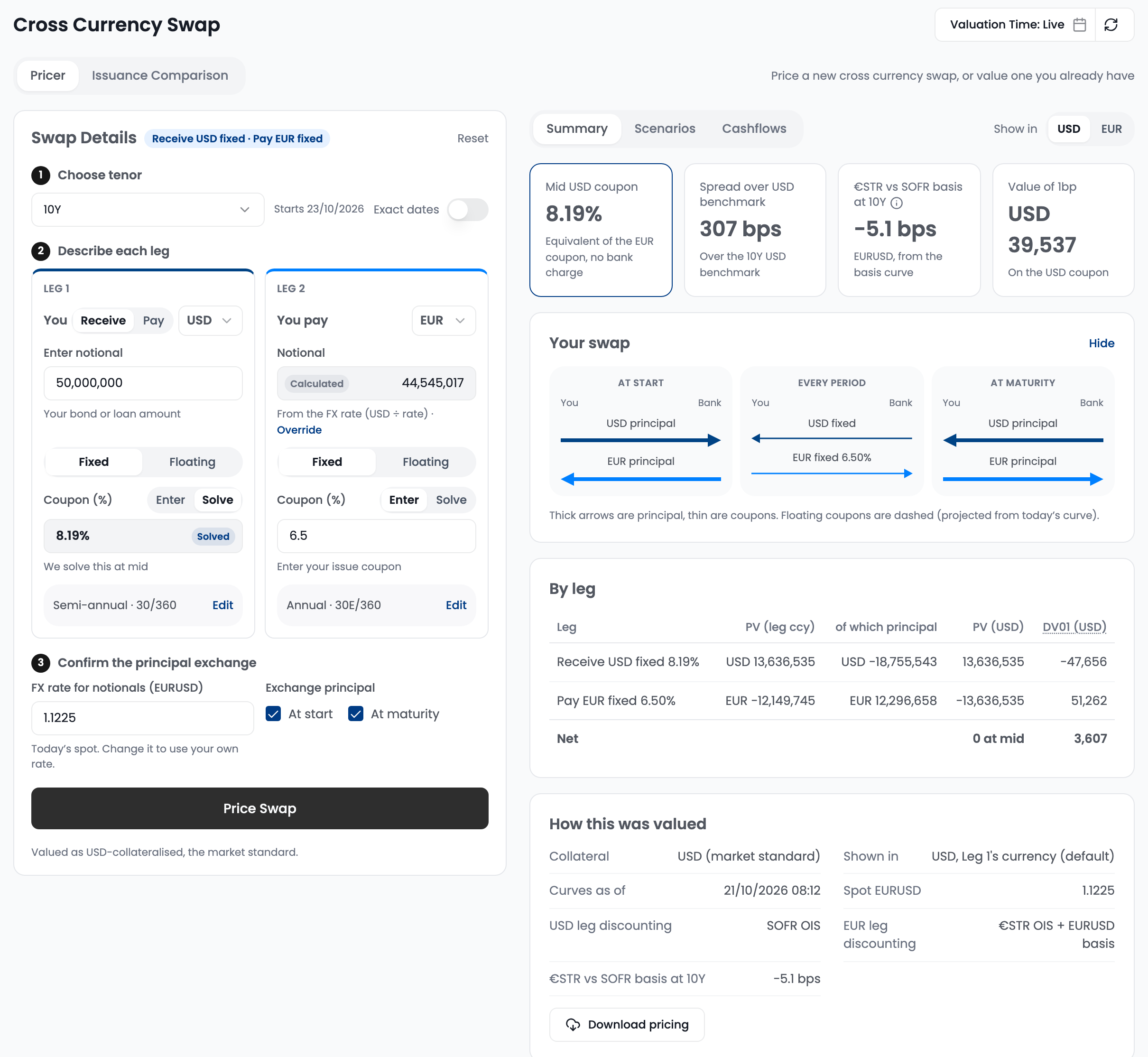
**1. Choose tenor.** Pick a tenor from 1Y to 30Y. The swap starts spot (T+2). For a forward start or your own start and end dates, switch on **Exact dates**.
**2. Describe each leg.**
* On **Leg 1**, choose **Receive** or **Pay**, the currency, and the notional, usually your bond or loan amount. Leg 2 always goes the other way.
* Leg 2's notional is calculated from the FX rate. Click **Override** to enter your own.
* Choose **Fixed** or **Floating** for each leg. Floating legs use SOFR, €STR, 3M or 6M EURIBOR, SONIA, 3M STIBOR or 3M NIBOR, and take a spread instead of a coupon.
* Set one leg to **Solve** to get today's mid rate, and **Enter** your rate on the other. To value a swap you have already traded, enter both rates.
* Payment frequency and day count default to each market's convention. Click **Edit** to change them.
**3. Confirm the principal exchange.** The FX rate defaults to today's spot. Change it to use your own rate, and choose whether principal is exchanged at start, at maturity, or both.
Click **Price Swap**, or **Value Swap** when both rates are entered. Swaps are valued as USD-collateralised, the market standard. Use **Show in** to switch every result between the two currencies.
By default the Pricer uses live market data. To price or value the swap as of an earlier date and time, set **Valuation Time: Live** in the top right of the page (shown while the Pricer tab is open); history goes back to 11 July 2024. A new valuation time reprices the swap on screen, and the refresh icon returns to live.
#### Summary
In the example above, you receive USD fixed on USD 50m and pay EUR fixed at 6.50% for 10 years. The pricer solves the USD coupon at **8.24%**. Put simply, a USD bond paying 8.24% swapped into EUR costs the same as a EUR bond paying 6.50%, before bank charges. If you can issue in USD below 8.24%, the synthetic route is cheaper.
| Tile | What it shows |
| ------------------------- | ----------------------------------------------------------------------------------------------- |
| **Mid coupon** | The solved rate on one leg, equivalent to the other leg's coupon, with no bank charge |
| **Spread over benchmark** | That coupon's spread over the government bond or swap benchmark for the same currency and tenor |
| **Basis** | The cross-currency basis at your tenor |
| **Value of 1bp** | How much the swap's value moves for a 1bp change in the solved coupon |
When you value an existing swap, the tiles switch to its **MtM** (and how much of it comes from FX), today's mid against your traded rate, and the **FX delta** for a 1% move in the exchange rate.
Below the tiles, **Your swap** draws the cash flows, **By leg** splits the value into each leg's present value and how much of it is principal, and **How this was valued** lists the collateral, curve time, spot rate and discount curves used. **Download pricing** exports it all.
#### Scenarios
Each row moves the market from today, then values the swap on the date you pick in **Value On**. Useful when there is a gap between pricing a deal and closing it.
* **Rate shift** sets the size of the four rate rows: all rates up, all rates down, and each currency on its own.
* The basis and FX rows (**Basis widens** and **USD weakens** here) have their own moves.
* Click any shaded cell to change a move, or **Add your own scenario**.
For each scenario you see the re-priced coupon, how far it is from today's mid, and the swap's value. Negative values are what you would pay to unwind.
#### Cashflows
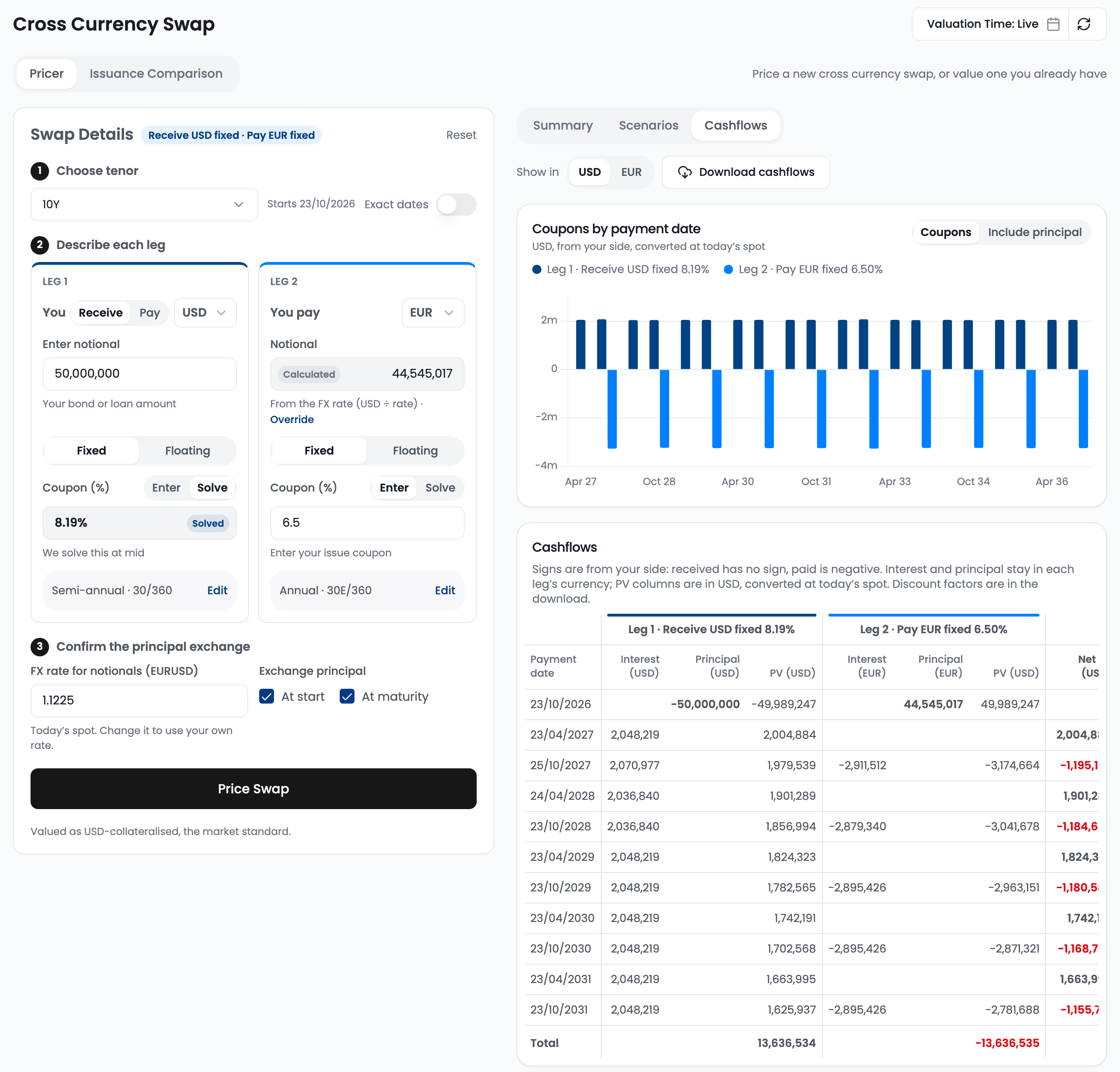
The chart shows every coupon by payment date. Switch to **Include principal** to add the principal exchanges. The table lists interest, principal and present value for each leg, with the net in your reporting currency. Floating coupons are projected from today's curves. **Download cashflows** exports the schedule with discount factors.
***
### Issuance Comparison
Use this tab for a quick read across tenors before going into detail.
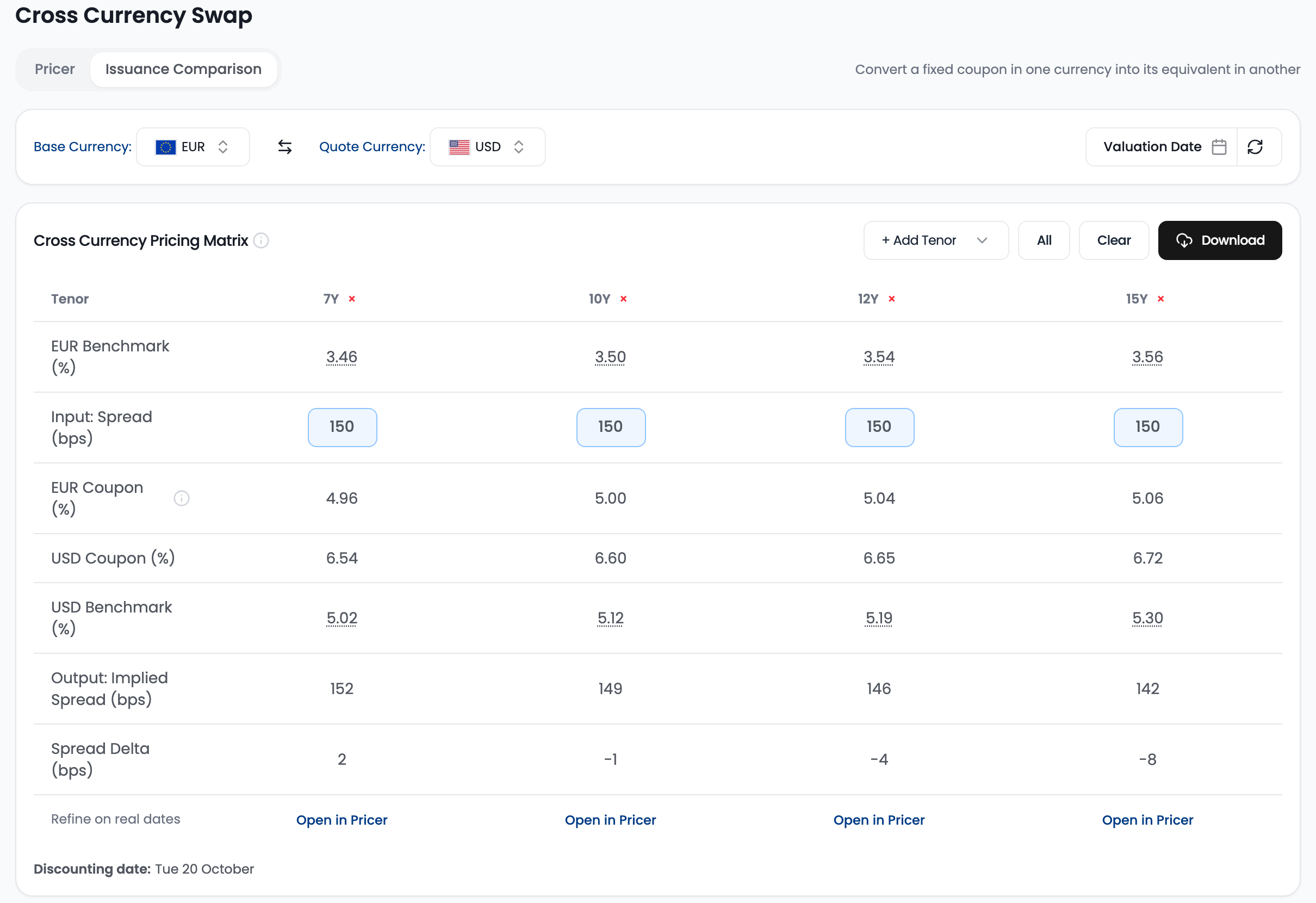
1. Pick a **Base Currency**, where you would issue at home, and a **Quote Currency**, the foreign market. USD, EUR, GBP, SEK and NOK are available.
2. Add tenors with **+ Add Tenor**, or click **All**.
3. Enter your **spread** over the base benchmark for each tenor. You can also edit the coupon directly and the spread back-solves.
| Row | What it shows |
| -------------------------- | --------------------------------------------------------------------------------------------------------------- |
| **Base benchmark** | The base currency benchmark: US Treasury for USD, gilt for GBP, swap rate for EUR, SEK and NOK. Hover to see it |
| **Input: Spread** | Your credit spread in the base market |
| **Base coupon** | Benchmark plus spread: your coupon if you issue at home |
| **Quote coupon** | The equivalent coupon in the quote currency, after the cross-currency swap |
| **Quote benchmark** | The quote currency benchmark |
| **Output: Implied Spread** | The quote coupon's spread over its benchmark |
| **Spread Delta** | Implied spread minus your input spread |
On screen, the base and quote rows are labelled with their currency, for example **EUR Benchmark (%)** and **USD Coupon (%)**.
**Reading it.** At 10Y, a EUR issue at 150bp over the 3.57% benchmark gives a 5.07% coupon. The equivalent USD coupon is 6.71%, or 147bp over the 5.24% USD benchmark. So if you can issue in USD inside 147bp, issuing in USD and swapping back beats issuing in EUR at 150bp. The spread delta of -3bp is that gap.
Click **Open in Pricer** under any tenor to refine it with real dates and notionals. Use **Valuation Date** to re-run the table for a past date.
#### History
* **Spread vs Tenor Analysis** plots your input spread against the implied spread at each tenor, with the delta as bars.
* **Historical Implied Spread** shows how the implied spread for one tenor has moved over the past year, so you can tell whether today is a good moment to issue abroad.
* **Cross-Currency Basis History** charts the basis for a currency pair and tenor over time.
**Download** exports any table or chart to Excel.
***
## Related
* [Swap Rates](/documentation/market-data-guides/swap-rates.md): how interest rate swaps work and how they are priced
* [Swap Pricer](/documentation/pricers/calculating-a-swap-rate.md): price a single-currency swap
* [Foreign Exchange](/documentation/market-data-guides/downloading-fx-forward-rates.md): spot and FX forward rates
---
# Agent Instructions
This documentation is published with GitBook. GitBook is the documentation platform designed so that both humans and AI agents can read, navigate, and reason over technical content effectively. Learn more at gitbook.com.
## Querying This Documentation
If you need additional information that is not directly available in this page, you can query the documentation by asking a question.
Perform an HTTP GET request on the following URL with the `ask` and `goal` query parameters:
```
GET https://www.bluegamma.io/documentation/pricers/cross-currency-pricer.md?ask=&goal=
```
`ask` is the immediate question: it should be specific, self-contained, and written in natural language.
`goal` is what the user is ultimately trying to achieve, the reason they need the answer. Sharing it helps GitBook give you a better, more relevant answer. A goal is most helpful when it describes the outcome the user wants rather than restating the question. For example, with `ask=how do I create an API token`, a goal like `automate deployments from our CI pipeline` lets GitBook tailor the answer to that use case.
The response will contain a direct answer to the question and relevant excerpts and sources from the documentation.
Use this mechanism when the answer is not explicitly present in the current page, you need clarification or additional context, or you want to retrieve related documentation sections.