> For the complete documentation index, see [llms.txt](https://www.bluegamma.io/documentation/llms.txt). Markdown versions of documentation pages are available by appending `.md` to page URLs; this page is available as [Markdown](https://www.bluegamma.io/documentation/pricers/defeasance-calculator.md).
# Defeasance Calculator
Estimate the cost of defeasing a fixed-rate US loan: the Treasury portfolio that covers the remaining payments, plus third-party fees.
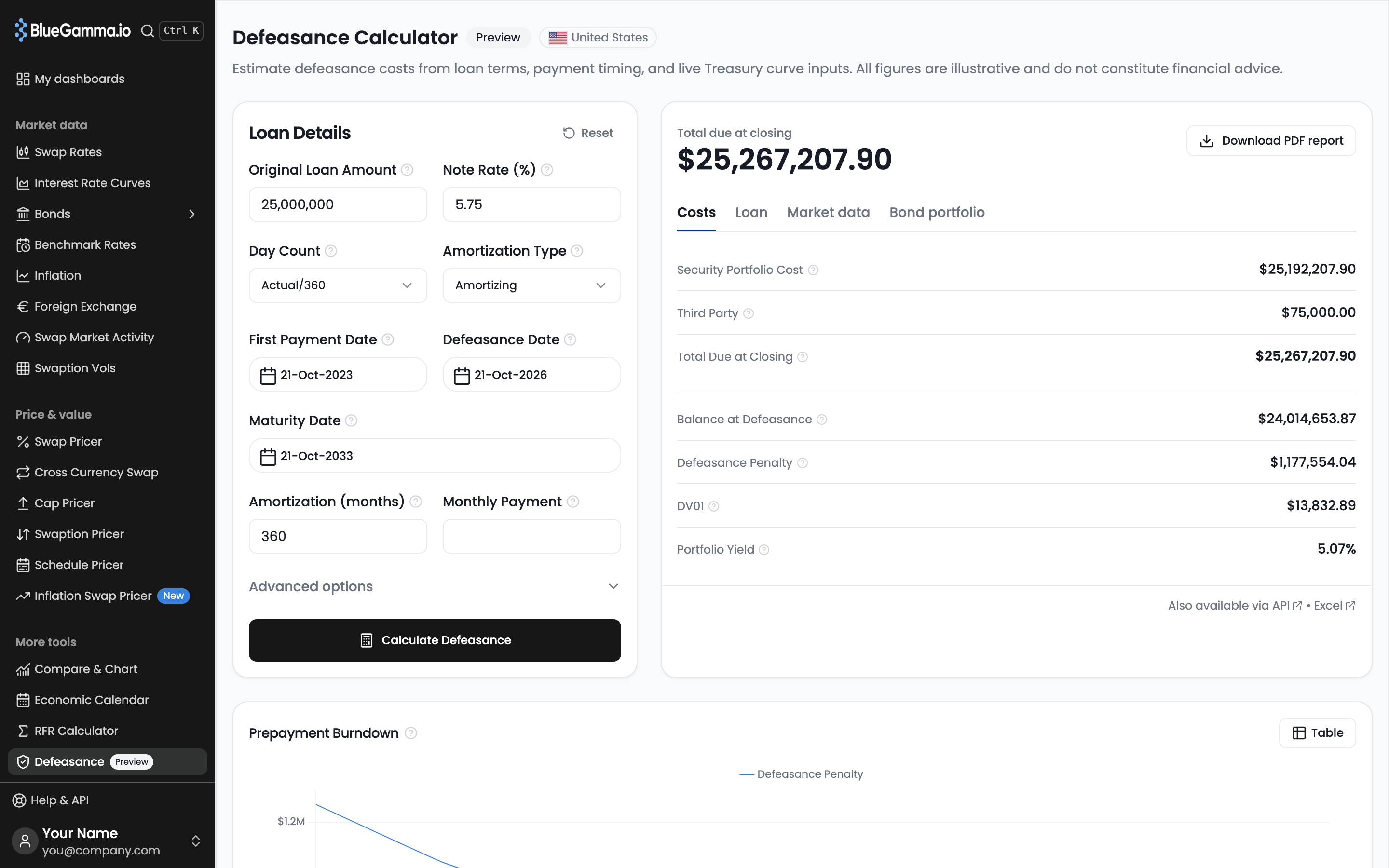
The **Defeasance Calculator** estimates what it costs to defease a fixed-rate US loan: the price of US Treasuries that cover every remaining scheduled payment, plus third-party fees. It discounts the payments on the US Treasury zero curve and shows how the cost changes if you defease later.
Open it from the sidebar in the **Pricers** section under **Loan Payment → Defeasance** (marked **Preview**). The page prices a default loan as soon as it opens.
{% hint style="info" %}
Results are estimates. The actual cost depends on the securities bought at execution and the fees in your loan documents.
{% endhint %}
***
### 1. Enter the Loan
In the **Loan Details** card:
| Field | Default | Notes |
| ------------------------- | -------------------------------- | -------------------------------------------------- |
| **Original Loan Amount** | 25,000,000 | Principal at origination |
| **Note Rate (%)** | 5.75 | The loan's fixed rate |
| **Day Count** | Actual/360 | Also 30/360, Actual/365, Act/Act ICMA |
| **Amortization Type** | Amortizing | Also Partial Interest Only, Interest Only |
| **First Payment Date** | 3 years ago | First scheduled monthly payment |
| **Defeasance Date** | Today | When you plan to defease |
| **Final IO Payment Date** | Today | Partial Interest Only: last interest-only payment |
| **Maturity Date** | 10 years after the first payment | Date of the balloon payment |
| **Amortization (months)** | 360 | Not used for Interest Only |
| **Monthly Payment** | Blank | Optional. Blank calculates it from the other terms |
Amber warnings flag unusual inputs, such as a note rate below 0.5% or above 20%, or a defeasance date more than 5 years out. They do not stop the calculation.
***
### 2. Set Advanced Options (Optional)
Under **Advanced options**:
* **Valuation Date**: price on a past day's closing Treasury curve. Today uses the live curve.
* **Curve Shock (bps)**: a parallel shift of the Treasury curve, for stress testing.
Click **Calculate Defeasance**. **Reset** restores the defaults.
***
### 3. Read the Result
The headline is **Total due at closing**.
| Tab | Rows |
| ------------------ | -------------------------------------------------------------------------------------------------------------------------------------------------------- |
| **Costs** | **Security Portfolio Cost**, **Third Party**, **Total Due at Closing**, **Balance at Defeasance**, **Defeasance Penalty**, **DV01**, **Portfolio Yield** |
| **Loan** | **Defeasance Date**, **Cost as % of Balance**, **Remaining Payments**, **Next Payment Date**, **Balloon Payment Made** (the maturity date) |
| **Market data** | **Valuation Date**, **Curve Data Updated** |
| **Bond portfolio** | A preview: the calculator does not yet select specific Treasury securities |
Below the result:
* **Prepayment Burndown**: the **Defeasance Penalty** if you defease later, every 3 months for up to 2 years and no later than 3 months before maturity, on the same curve. The table view adds **Total Due at Closing**.
* **Payment Discounting Breakdown**: one row per remaining payment with **Payment Date**, **Amount**, **Zero Rate**, **Discount Factor** and **Present Value**, as a table or graph.
* **Treasury Yield Curve**: the US Treasury zero curve up to the loan's maturity.
**Download PDF report** saves the estimate, with the burndown and discounting tables.
## How It Is Calculated
1. The monthly schedule runs from the first payment date to maturity. Each month's interest is balance × note rate × day count fraction. Amortizing loans pay a level payment set by the note rate and **Amortization (months)**, unless you enter **Monthly Payment**. The last payment repays the remaining balance.
2. **Balance at Defeasance** is the balance after the last payment on or before the defeasance date.
3. Each later payment is discounted to the defeasance date on the US Treasury zero curve for the valuation date, plus any curve shock:
$$
\text{Security Portfolio Cost} = \sum\_i \text{Payment}\_i \times DF\_i
$$
4. **Total Due at Closing** is Security Portfolio Cost plus **Third Party**, a fixed fee estimate that is the same for every loan.
5. **Defeasance Penalty** is Security Portfolio Cost minus Balance at Defeasance, without fees.
6. **Cost as % of Balance** is Total Due at Closing ÷ Balance at Defeasance.
7. **DV01** is the fall in Security Portfolio Cost when the curve rises by 1bp.
8. **Portfolio Yield** is the annually compounded yield that discounts the remaining payments to the Security Portfolio Cost.
The **Zero Rate** column is semi-annually compounded.
## Related
* [Make-Whole Calculator](/documentation/pricers/make-whole-calculator.md): prepayment under a make-whole or yield maintenance clause
* [Government Bond Curves](/documentation/methodology/government-bond-curves.md): how the US Treasury zero curve is built
* [RFR Calculator](/documentation/pricers/rfr-calculator.md): compounded overnight rates for floating-rate loans
---
# Agent Instructions
This documentation is published with GitBook. GitBook is the documentation platform designed so that both humans and AI agents can read, navigate, and reason over technical content effectively. Learn more at gitbook.com.
## Querying This Documentation
If you need additional information that is not directly available in this page, you can query the documentation by asking a question.
Perform an HTTP GET request on the following URL with the `ask` and `goal` query parameters:
```
GET https://www.bluegamma.io/documentation/pricers/defeasance-calculator.md?ask=&goal=
```
`ask` is the immediate question: it should be specific, self-contained, and written in natural language.
`goal` is what the user is ultimately trying to achieve, the reason they need the answer. Sharing it helps GitBook give you a better, more relevant answer. A goal is most helpful when it describes the outcome the user wants rather than restating the question. For example, with `ask=how do I create an API token`, a goal like `automate deployments from our CI pipeline` lets GitBook tailor the answer to that use case.
The response will contain a direct answer to the question and relevant excerpts and sources from the documentation.
Use this mechanism when the answer is not explicitly present in the current page, you need clarification or additional context, or you want to retrieve related documentation sections.