> For the complete documentation index, see [llms.txt](https://www.bluegamma.io/documentation/llms.txt). Markdown versions of documentation pages are available by appending `.md` to page URLs; this page is available as [Markdown](https://www.bluegamma.io/documentation/pricers/pricing-a-cap.md).
# Cap Pricer
Price an interest rate cap on your loan's own dates and notional schedule, live or as of a past date, with an estimated bank charge, running cost, breakeven and a strike/tenor price grid.
The [Cap Pricer](https://app.bluegamma.io/cap-pricer) gives an indicative price for an interest rate cap on your loan's own schedule, and compares capping with fixing through a swap and staying floating.
***
### 1. Describe Your Cap
* **Go to** [**Cap Pricer**](https://app.bluegamma.io/cap-pricer)
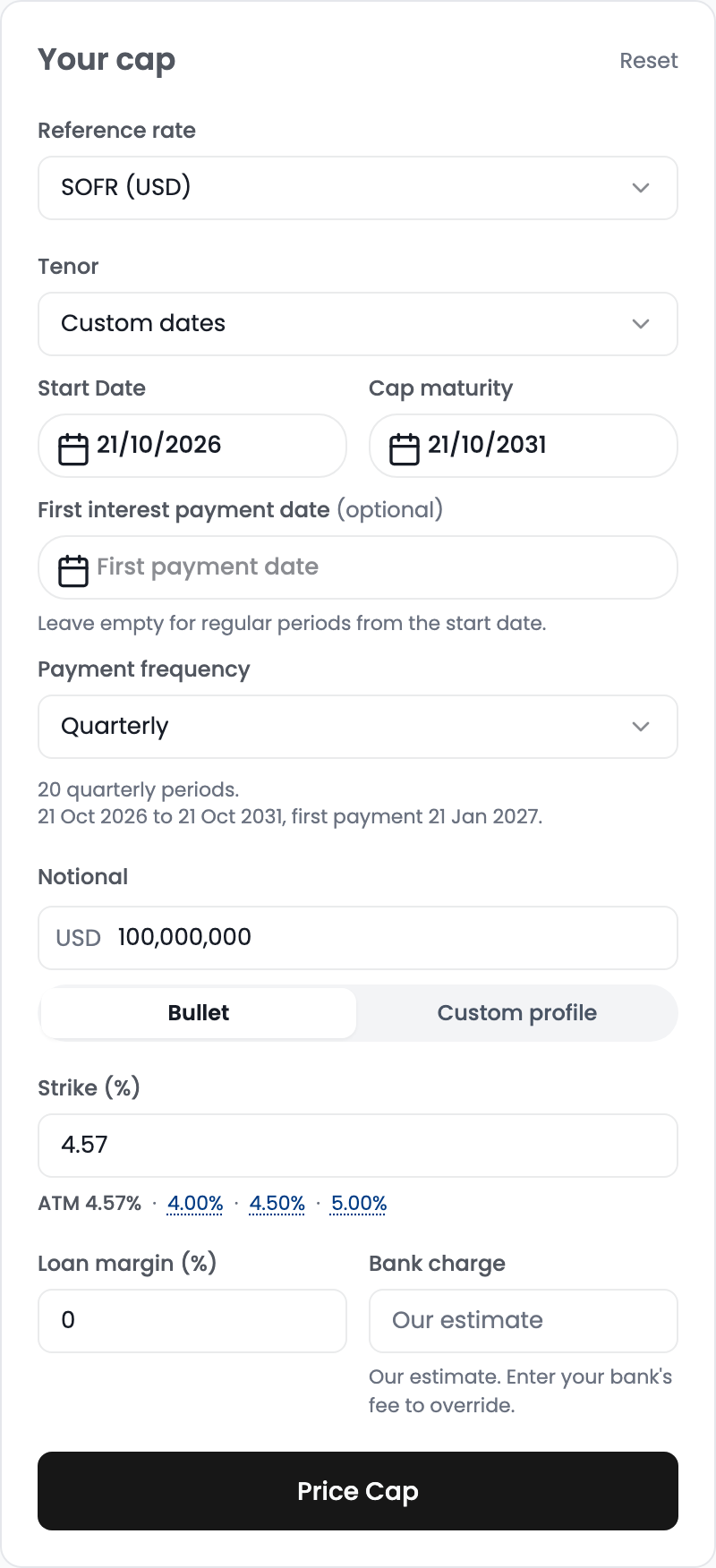
* In the **Your cap** panel on the left, choose:
1. **Reference rate**: the floating rate your loan pays (e.g. SOFR, SONIA, 3M EURIBOR).
2. **Tenor**: 1Y to 30Y from spot, or **Custom dates** to use your loan's own dates (see step 2).
3. **Payment frequency**: Monthly, Quarterly or Semi-annual. Each period is one caplet.
A line under the frequency confirms the schedule: start and end dates, number of periods and the first payment date.
***
### 2. Use Your Loan's Dates (Optional)
Choose **Custom dates** in **Tenor** to enter:
* **Start Date**: when the cap starts. Leave it empty to start at spot.
* **Cap maturity**: when the cap ends.
* **First interest payment date** (optional): your loan's first payment date. A date earlier than one full period gives a **short first period**, a later date gives a **long first period**, and regular periods run on from it. Leave it empty for regular periods from the start date.
If the maturity is off the regular cycle, the last period is short. The schedule line shows any short or long period with its dates and number of days.
***
### 3. Set the Notional
Enter the **Notional**, then pick a **Notional shape**:
* **Bullet**: the same balance in every period.
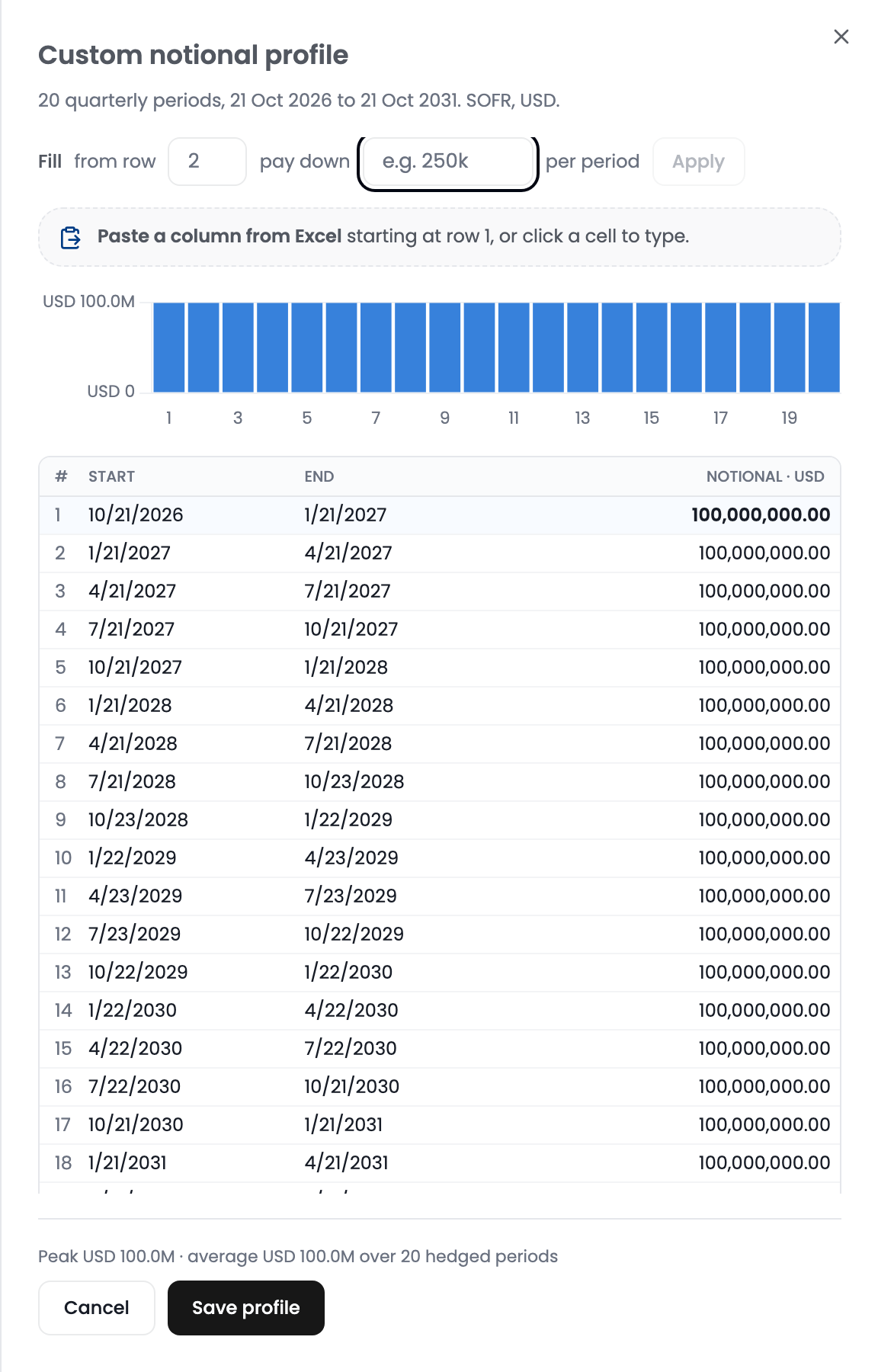
* **Custom profile**: a balance for each period, for amortising loans, drawdowns, or a build-up followed by a paydown. It opens the **Custom notional profile** panel with one row per period of the schedule:
* **Paste a column from Excel** starting at row 1, or click a cell to type a balance.
* Use **Fill** to pay down a fixed amount per period from a chosen row, for straight-line amortisation, then click **Apply**.
* Click **Save profile**.
The form then shows the profile as a small chart with its number of periods and peak balance. Click **Edit** to change it. If you change the dates afterwards, the balances carry over to the new periods and the form asks you to **Review** them.
***
### 4. Set the Strike, Margin and Bank Charge
* **Strike (%)**: the rate ceiling. Leave it empty to price at the money, or click **ATM** or **ATM + 50bp** under the field.
* **Loan margin (%)**: your loan's margin over the reference rate, used when the cap is compared with a swap and staying floating.
Click **Price Cap**. **Reset**, at the top of the **Your cap** panel, returns every input to its default and clears the result.
After the first price, a **Bank charge** field appears next to the margin. By default the price includes our estimate of the bank's charge, based on the rate and volatility risk the bank takes on when it sells the cap. If your bank has quoted a fee, enter it in the cap's currency to override the estimate, then click **Price Cap** again. Clear the field to go back to the estimate, or enter 0 to see the mid-market price on its own.
***
### 5. Reading the Results
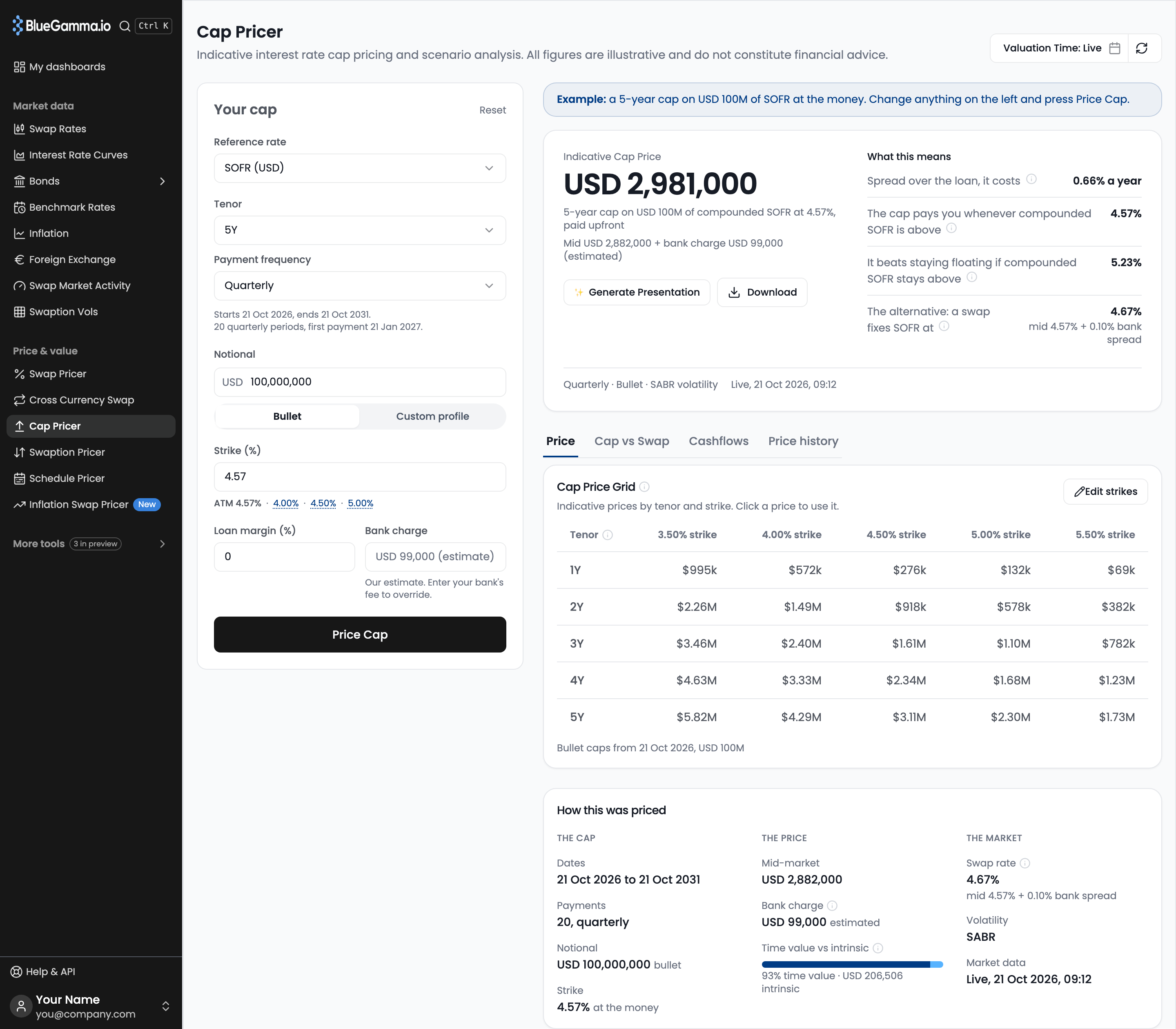
**Indicative Cap Price** is the upfront price: the mid-market price plus the bank charge. The line under it shows the split, with the bank charge marked **(estimated)** or **(your fee)**. Use **Download Excel** or **Generate Presentation** to share the result.
**Minimum price.** Indicative cap prices start at USD 20,000, or the equivalent in the cap's currency. If mid plus our estimated bank charge comes to less, the price shown is the minimum, the line under it reads **Minimum price applies**, and the bank charge is the difference between the minimum and mid. The minimum does not apply when you enter your own bank fee.
**What this means** puts the price in borrower terms:
* **Spread over the loan, it costs**: the running cost, the upfront price expressed as a rate per year over the loan. If you pay for the cap through the loan instead of upfront, banks usually add a financing spread, so the yearly cost would be higher.
* **The cap pays you whenever ... is above**: the strike. Together with the loan, your interest is effectively capped at the strike plus your margin.
* **It beats staying floating if ... stays above**: the breakeven. If the rate stays above this level for the whole term, the cap pays out more than it costs.
* **The alternative: a swap fixes ... at**: the swap rate on the same schedule, mid-market plus a bank spread, so it compares like for like with the cap price.
The running cost and the breakeven both include the bank charge, so they move when you override it.
Below the summary, four tabs give the detail:
* **Price**: the **Cap Price Grid** of indicative prices across tenors and strikes. Click a price to price that tenor and strike. **How this was priced** lists the cap's dates, payments, notional and strike, the mid-market price, bank charge and time value vs intrinsic, and the market inputs.
* **Cap vs Swap**: a short summary, total interest if rates move for Floating, Swap, Cap and a 50/50 blend, the forward rate path against your strike, and the outcome of each choice if the forward curve shifts.
* **Cashflows**: one row per period with start and end dates, notional, forward rate, strike and caplet price.
* **Price history**: this cap's indicative price at each Friday close, with the same strike, tenor and notional.
{% hint style="info" %}
**SABR volatility smile:** For SOFR caps, the pricer uses a SABR model calibrated from market data. Other indices use flat ATM volatility.
{% endhint %}
***
### 6. Price at a Past Time
By default the pricer uses live market data. To price as of an earlier date and time, set **Valuation Time: Live** in the top right of the page; the earliest date is 17 March 2026. An amber **Historical pricing.** bar then shows the time the curves, volatilities and spot dates are taken from, and the button reads **Price Cap as of** that date. Click **Back to live** on the bar to return to live pricing.
**Generate Presentation** uses live prices only, so it is unavailable while a past time is set. **Download Excel** still works.
***
### 7. Supported Indices
The Cap Pricer supports 30+ indices including:
* **G10:** SOFR, SONIA, 1M/3M/6M EURIBOR, SARON, TONAR, 3M/6M TIBOR, 3M CDOR
* **Nordics:** NOWA, SWESTR, STINA, DESTR, CITA
* **Asia-Pacific:** 3M HIBOR, HONIA, 3M KLIBOR, OCR, NZONIA, 91D CD, 3M TAIBOR, 7D REPO
* **Middle East & Africa:** 3M SAIBOR, 3M JIBAR, ZARONIA
* **LatAm & CEEMEA:** TIIEON, 3M/6M PRIBOR, 3M/6M BUBOR
***
### Related
{% content-ref url="/pages/yAEYZXVZ9Xmoyxuce8uC" %}
[Swap Pricer](/documentation/pricers/calculating-a-swap-rate.md)
{% endcontent-ref %}
{% content-ref url="/pages/IMxrSKFunnNzGDJfejhe" %}
[Pricing an Interest Rate Cap](/documentation/integrations/api/how-to-guides/pricing-an-interest-rate-cap.md)
{% endcontent-ref %}
---
# Agent Instructions
This documentation is published with GitBook. GitBook is the documentation platform designed so that both humans and AI agents can read, navigate, and reason over technical content effectively. Learn more at gitbook.com.
## Querying This Documentation
If you need additional information that is not directly available in this page, you can query the documentation by asking a question.
Perform an HTTP GET request on the following URL with the `ask` and `goal` query parameters:
```
GET https://www.bluegamma.io/documentation/pricers/pricing-a-cap.md?ask=&goal=
```
`ask` is the immediate question: it should be specific, self-contained, and written in natural language.
`goal` is what the user is ultimately trying to achieve, the reason they need the answer. Sharing it helps GitBook give you a better, more relevant answer. A goal is most helpful when it describes the outcome the user wants rather than restating the question. For example, with `ask=how do I create an API token`, a goal like `automate deployments from our CI pipeline` lets GitBook tailor the answer to that use case.
The response will contain a direct answer to the question and relevant excerpts and sources from the documentation.
Use this mechanism when the answer is not explicitly present in the current page, you need clarification or additional context, or you want to retrieve related documentation sections.