> For the complete documentation index, see [llms.txt](https://www.bluegamma.io/documentation/llms.txt). Markdown versions of documentation pages are available by appending `.md` to page URLs; this page is available as [Markdown](https://www.bluegamma.io/documentation/pricers/rfr-calculator.md).
# RFR Calculator
Compound an overnight risk-free rate over any past period, and see the daily workings behind the result.
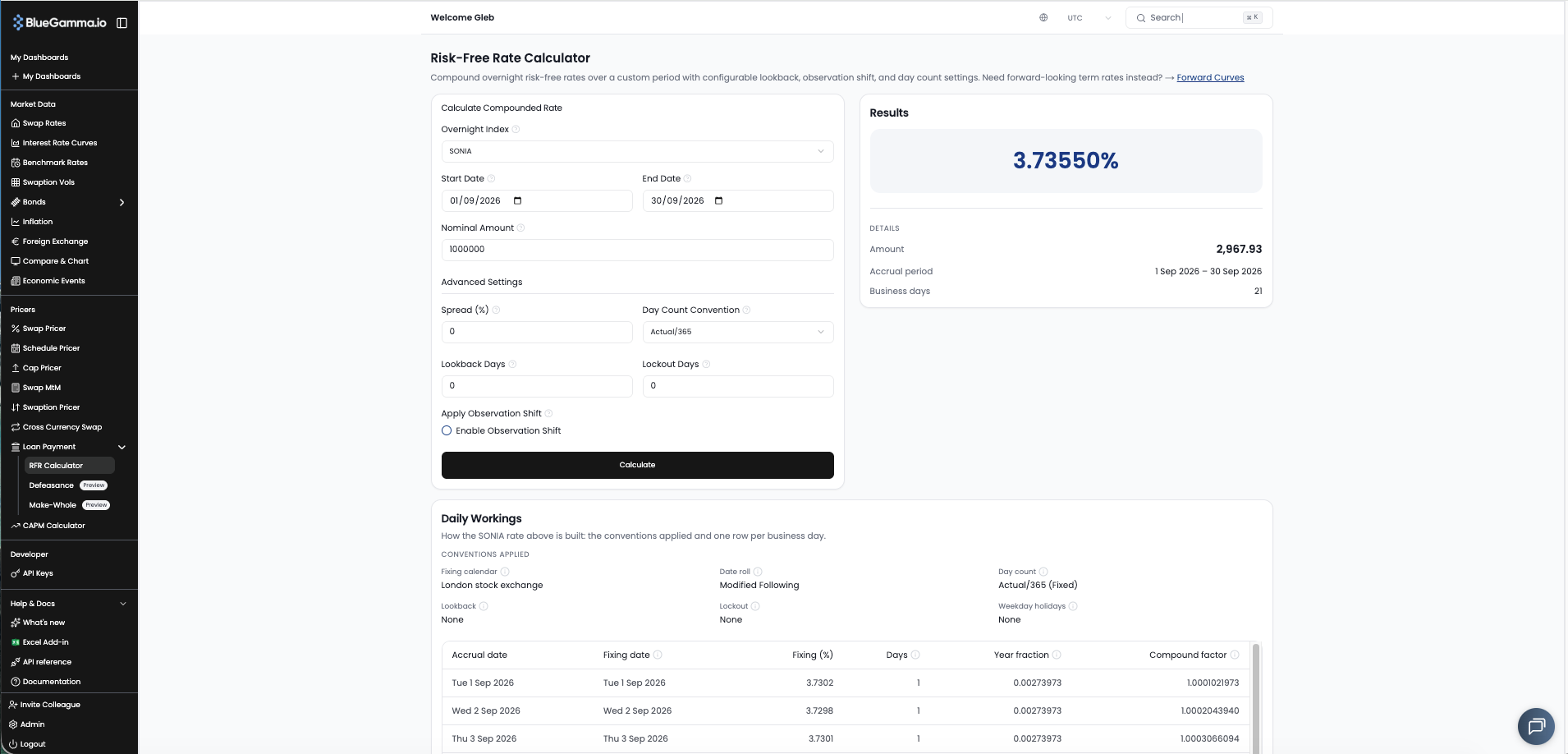
The **RFR Calculator** compounds an overnight risk-free rate over a period you choose, with the lookback, lockout and day count your loan or swap uses. A **Daily Workings** card under the result shows how the rate was built, one business day at a time, so you can check it line by line against a bank's or agent's figure.
Open it from the sidebar under **Loan Payment → RFR Calculator**.
***
### 1. Choose the Index and Period
* **Overnight Index**: SOFR, SONIA, ESTR, SORA, TONAR, CORRA, SARON or ZARONIA.
* **Start Date** and **End Date**: the compounding period. It defaults to last month. The rate is built from published fixings, so the end date cannot be in the future.
* **Nominal Amount**: the amount the interest is calculated on.
***
### 2. Match Your Conventions
Under **Advanced Settings**:
* **Spread (%)**: an additional spread, in percent (enter 2.5 for 2.5%).
* **Day Count Convention**: Actual/360, Actual/365 or 30/360 (Bond Basis).
* **Lookback Days**: how many business days earlier each day's fixing is taken.
* **Lockout Days**: the number of days at the end of the period without new fixings.
* **Apply Observation Shift**: tick **Enable Observation Shift** so the day weights follow the observation dates too.
Each index starts on its usual day count, and SOFR and ZARONIA start with a 5 day lookback. Set these to match your loan agreement or trade confirmation, then click **Calculate**.
***
### 3. Read the Result
The **Results** card shows the compounded rate, annualised. Under **Details**:
* **Amount**: the interest on the nominal for the period.
* **Accrual period**: the dates the calculation ran over, after any date roll.
* **Business days**: the number of business days in the period.
***
### 4. Check the Daily Workings
The **Daily Workings** card under the result shows the conventions applied, then one row per business day.
**Conventions**
| Item | What it shows |
| -------------------- | ----------------------------------------------------------------------------------------------------- |
| **Fixing calendar** | The calendar used for the accrual schedule, the lookback and the date roll |
| **Date roll** | How a start or end date that is not a business day is moved onto one, and the rolled date if it moved |
| **Day count** | Used for each day's year fraction and to annualise the compounded rate |
| **Lookback** | The lookback in business days, with or without observation shift |
| **Lockout** | The lockout in business days. The last days reuse the fixing from the day before the lockout starts |
| **Weekday holidays** | Weekdays inside the period that the calendar treats as holidays |
**One row per business day**
| Column | What it shows |
| ------------------- | ----------------------------------------------------------------------------------------------------------------------------------- |
| **Accrual date** | The business day. Tagged **Holiday** with the date of any holiday whose days it carries |
| **Fixing date** | The date whose published fixing this day uses, after lookback and lockout. Tagged **Lockout** where the lockout applies |
| **Fixing (%)** | The published fixing |
| **Days** | Calendar days the fixing is weighted by, up to the next business day, so weekends and holidays fall on the business day before them |
| **Year fraction** | Days under the day count convention |
| **Compound factor** | Running product of the daily factors, 1 + fixing × year fraction |
Long periods show the first 250 business days, with a button under the table to load the rest.
***
## Related
* [Fetching Compounded RFR Rates](/documentation/integrations/api/how-to-guides/fetching-compounded-rfr-rates.md): the same calculation through the API
* [Swap Mark-to-Market](/documentation/pricers/calculating-the-mtm-of-a-swap.md): lookback on a traded swap
---
# Agent Instructions
This documentation is published with GitBook. GitBook is the documentation platform designed so that both humans and AI agents can read, navigate, and reason over technical content effectively. Learn more at gitbook.com.
## Querying This Documentation
If you need additional information that is not directly available in this page, you can query the documentation dynamically by asking a question.
Perform an HTTP GET request on the current page URL with the `ask` query parameter, and the optional `goal` query parameter:
```
GET https://www.bluegamma.io/documentation/pricers/rfr-calculator.md?ask=&goal=
```
`ask` is the immediate question: it should be specific, self-contained, and written in natural language.
`goal` is optional and describes the broader end goal you are ultimately trying to accomplish on behalf of the user. GitBook uses it to tailor the answer towards what is most useful for that goal.
The response will contain a direct answer to the question and relevant excerpts and sources from the documentation.
Use this mechanism when the answer is not explicitly present in the current page, you need clarification or additional context, or you want to retrieve related documentation sections.