> For the complete documentation index, see [llms.txt](https://bluegamma.io/documentation/llms.txt). Markdown versions of documentation pages are available by appending `.md` to page URLs; this page is available as [Markdown](https://bluegamma.io/documentation/integrations/excel-add-in/how-to-guides/how-to-pull-fx-forward-rates-in-excel.md).
# How to Pull FX Forward Rates in Excel
Pull FX forward rates directly into Excel using BlueGamma's Excel Add-in. Forecast future exchange rates for hedging, cash flow forecasting, and financial modeling.
BlueGamma's Excel Add-in lets you fetch FX forward rates directly into your financial model using a simple function. This guide walks you through building an FX forward curve in Excel for forecasting foreign currency exposure.
### Before You Start
To follow this guide, make sure you have:
* Installed the BlueGamma Excel Add-in
* Signed in through the BlueGamma tab in Excel
* An active BlueGamma trial or subscription
If you haven't set this up yet, see:
{% content-ref url="/pages/cIh9SrulGOViAKc9OE27" %}
[Installation & Setup](/documentation/integrations/excel-add-in/installation-and-setup.md)
{% endcontent-ref %}
***
### 1. Choose the Currency Pair
FX forward rates require a currency pair in the format `BASEQUOTE` (e.g., `EURUSD`).
Common currency pairs include:
* `EURUSD` - Euro to US Dollar
* `GBPUSD` - British Pound to US Dollar
* `USDJPY` - US Dollar to Japanese Yen
* `AUDUSD` - Australian Dollar to US Dollar
* `USDCAD` - US Dollar to Canadian Dollar
Place the currency pair in a fixed cell for easy referencing:
```
A1 = "EURUSD"
```
{% content-ref url="/pages/V5BVY98UcwQpCdpKqzbj" %}
[Available Indices](/documentation/integrations/available-indices.md)
{% endcontent-ref %}
***
### 2. Set Up Future Dates
Create a schedule of future dates for which you need FX forward rates. These typically align with:
* **Foreign currency debt service dates**
* **Revenue or payment schedules**
* **Capital expenditure timelines**
* **Hedge settlement dates**
For example, if you have quarterly foreign currency payments:
| | C | D | E | F | G |
| -------- | ---------- | ---------- | ---------- | ---------- | ---------- |
| **Date** | 2026-03-31 | 2026-06-30 | 2026-09-30 | 2026-12-31 | 2027-03-31 |
***
### 3. Pull FX Forward Rates
Use the BlueGamma function:
```
=BlueGamma.FX_FORWARD(currency_pair, [date])
```
**Example:**
```
=BlueGamma.FX_FORWARD($A$1, C1)
```
This returns the forward exchange rate for the currency pair in `A1` on the date in `C1`.
Fill the formula across your date schedule to generate a complete forward curve.
***
### 4. Build a Complete FX Forecast Table
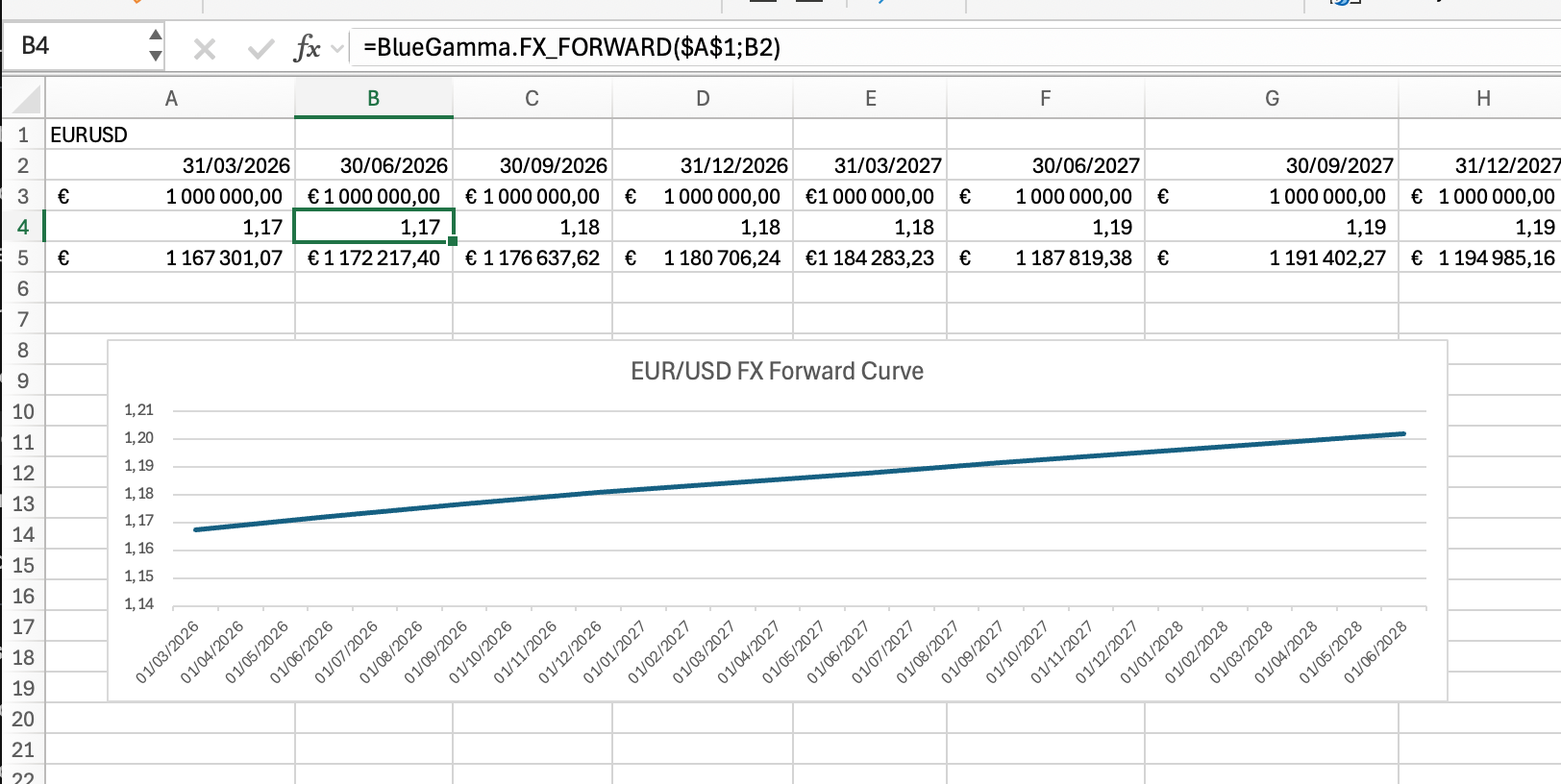
Here's a practical example showing how to forecast the USD equivalent of EUR-denominated debt payments:
| | A | B | C | D | E | F |
| ------------------- | ------------------------------- | ------------------------------- | ------------------------------- | ------------------------------- | ------------------------------- | - |
| **Currency Pair** | EURUSD | | | | | |
| **Payment Date** | 2026-03-31 | 2026-06-30 | 2026-09-30 | 2026-12-31 | 2027-03-31 | |
| **EUR Payment** | 1,000,000 | 1,000,000 | 1,000,000 | 1,000,000 | 1,000,000 | |
| **FX Forward Rate** | =BlueGamma.FX\_FORWARD($A$1,B2) | =BlueGamma.FX\_FORWARD($A$1,C2) | =BlueGamma.FX\_FORWARD($A$1,D2) | =BlueGamma.FX\_FORWARD($A$1,E2) | =BlueGamma.FX\_FORWARD($A$1,F2) | |
| **USD Equivalent** | =B3\*B4 | =C3\*C4 | =D3\*D4 | =E3\*E4 | =F3\*F4 | |
This setup gives you:
1. The forward FX rate for each payment date
2. The projected USD value of each EUR payment
3. A clear view of your foreign currency exposure over time
Complete FX forecast table with USD equivalents
***
### 5. Sense-Check Your Data
Before relying on the FX forward rates, validate them against [app.bluegamma.io](https://app.bluegamma.io):
1. Navigate to **Foreign Exchange** in the BlueGamma app
2. Select the same currency pair (e.g., EURUSD)
3. Compare a few key dates and rates
4. Confirm the forward curve shape and levels match your Excel output
This verification ensures your model is using accurate, up-to-date data.
***
### 6. Common Use Cases
**FX Hedging for Foreign Currency Debt**
If you have debt denominated in a foreign currency, use forward rates to:
* Forecast future debt service in home currency
* Determine optimal hedge ratios
* Evaluate the cost of FX hedges vs. unhedged exposure
**Modeling Foreign Revenue**
For companies with foreign currency revenue:
* Project home currency equivalent of future sales
* Assess FX translation risk
* Build scenario analysis with different FX paths
**Capital Expenditure Planning**
When planning foreign investments or purchases:
* Estimate home currency cost of future foreign expenditures
* Budget for FX-related costs
* Compare domestic vs. foreign sourcing options
***
### Function Reference
For complete details on the FX forward function, see:
{% content-ref url="/pages/RC1cCYAnS7Rbn8j9pLC2" %}
[Get FX Forward Rate](/documentation/integrations/excel-add-in/functions/get-fx-forward-rate.md)
{% endcontent-ref %}
For the current spot rate, use:
{% content-ref url="/pages/9PFMJbuSLh11kWDyjZUG" %}
[Get FX Rate](/documentation/integrations/excel-add-in/functions/get-fx-rate.md)
{% endcontent-ref %}
***
### Troubleshooting
**Function returns #ERROR or #VALUE**
* Check that the currency pair format is correct (e.g., `EURUSD`, not `EUR/USD`)
* Verify the date is in a valid format
* Ensure you're signed in through the BlueGamma tab
**Rates look unexpected**
* Verify you're using the correct base/quote currency order
* Cross-check a few rates against the BlueGamma web app
* Make sure you're not accidentally using a historical valuation date
For more help, see:
{% content-ref url="/pages/Ayt7TZT4XuzgedXJRJcO" %}
[Troubleshooting](/documentation/integrations/excel-add-in/troubleshooting.md)
{% endcontent-ref %}
***
You now have live FX forward rates directly in Excel, ready to feed into your financial models, hedging analysis, and cash flow forecasts.
**Ready to pull live FX forward rates into your model?**
[Create a free BlueGamma trial](https://auth.bluegamma.io/sign-up) and start using the Excel Add-in today.
---
# Agent Instructions
This documentation is published with GitBook. GitBook is the documentation platform designed so that both humans and AI agents can read, navigate, and reason over technical content effectively. Learn more at gitbook.com.
## Querying This Documentation
If you need additional information that is not directly available in this page, you can query the documentation dynamically by asking a question.
Perform an HTTP GET request on the current page URL with the `ask` query parameter, and the optional `goal` query parameter:
```
GET https://bluegamma.io/documentation/integrations/excel-add-in/how-to-guides/how-to-pull-fx-forward-rates-in-excel.md?ask=&goal=
```
`ask` is the immediate question: it should be specific, self-contained, and written in natural language.
`goal` is optional and describes the broader end goal you are ultimately trying to accomplish on behalf of the user. GitBook uses it to tailor the answer towards what is most useful for that goal.
The response will contain a direct answer to the question and relevant excerpts and sources from the documentation.
Use this mechanism when the answer is not explicitly present in the current page, you need clarification or additional context, or you want to retrieve related documentation sections.